Reverse Engineering a Banking Malware Hidden Inside an APK
The Call That Started Everything
It started with something that looked completely normal.
A phone call.
Someone claiming to be from SBI customer support informed the victim that their YONO SBI application needed an urgent update.
The reason sounded serious enough to create panic.
“If you don’t update your AADHAR NO. tonight, your account will be blocked.”
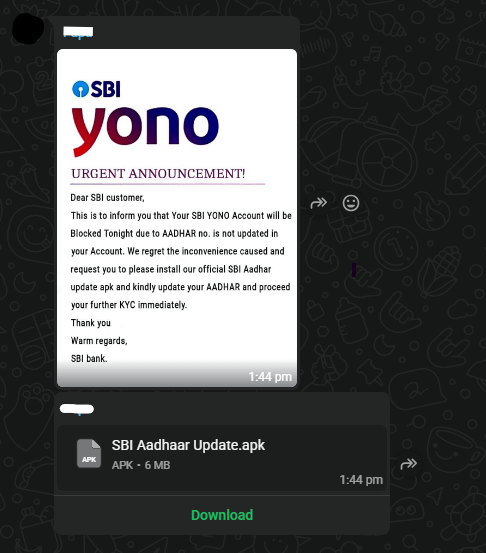
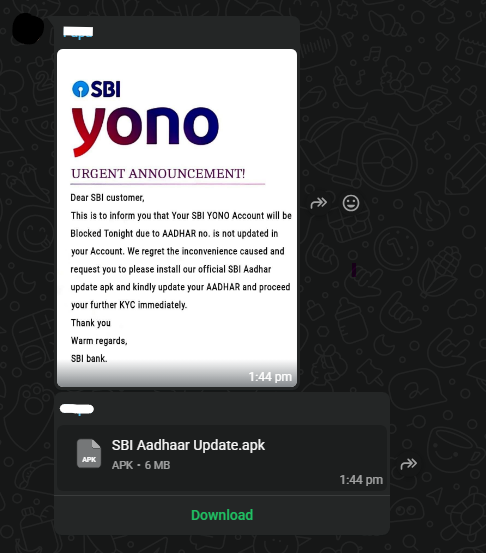
Moments later, a WhatsApp message arrived.
It contained:
• a message about YONO update
• a bank-style image
• an APK file
Trusting the message, the victim downloaded and installed the APK.
And that is when the real problem began.
As soon as the application was installed, the attacker effectively gained control over the victim’s WhatsApp activity.
Within minutes, the same message, along with the malicious APK, started appearing in multiple chats and WhatsApp groups.
But this time, the sender was not the attacker.
It was the victim.
Friends and family began replying:
“Did you send this update?”
“Is this a real SBI app?”
“Why are you sending this APK?”
The victim had not sent anything.
At that moment, it became clear that the installed application was not a banking update at all, it was malware that had taken advantage of the device to spread itself through WhatsApp conversations.
To understand how this was happening, the suspicious APK was extracted from the phone and moved into a controlled Kali Linux environment for deeper analysis.
What initially looked like a simple banking update had now become a full malware investigation.
Attack Chain
Attacker call
      ↓
Fake SBI update message
      ↓
Victim installs APK
      ↓
Malware loads second-stage payload
      ↓
Native library loads configuration
      ↓
Contacts attacker server
      ↓
Credential harvesting
      ↓
Propagation through messaging apps
The APK That Refused to Open
When we first moved the suspicious APK into our Kali Linux analysis environment, something strange happened.
The APK refused to extract properly.
Our tools immediately showed errors and corrupted headers. At first it looked like the file was simply broken.
But in malware analysis, a corrupted file is often a deliberate trick.
Attackers sometimes modify APK structures to:
• confuse analysis tools
• bypass antivirus scanners
• hide malicious payloads deeper inside the file
So instead of giving up, we looked deeper.
And that’s when we found the first surprise.
The Hidden APK
Inside the APK’s assets folder, another file was hiding.
SBI Aadhaar Update.apk
        │
        └── assets/
            ├── dummy.apk
            ├── Google_Play.png
            └── main_ui.html
This changed everything.
The APK that the victim installed was not the real malware.
It was just a loader.
The actual malicious payload was hidden inside dummy.apk.
This technique is commonly used by Android malware to avoid detection and make analysis harder.
Once we extracted the hidden APK, the real investigation began.
A Suspicious Native File
Inside the payload, one file immediately caught our attention:
libsb1bank.cpp.so
This was a native C/C++ library, which attackers often use to hide important data.
A quick string scan revealed several interesting function names:
Java_com_service_sb1bank_Helper_FormCode
Java_com_service_sb1bank_Helper_DomainUrl
Java_com_service_sb1bank_Helper_WsJwtSecret
Even without fully reversing the code, the names tell us a lot.
The library likely contains:
• backend server addresses
• authentication secrets
• configuration values used by the malware
So the next question was obvious.
Where is the malware connecting to?
The GitHub Clue
While scanning the files, we discovered a suspicious URL:
https://slientkill3r.github.io/changer6/
At first this looked harmless, it’s hosted on GitHub Pages.
But when we queried it, something unusual appeared.
Instead of normal text, the page returned an encoded string:
aHR0cHM6Ly9zLm5ld2hlYmhhaWVrZGFtLmNvbS9hcGkvcHVibGljIGh0dHBzOi8vcy5uZXdoZWJoYWlla2RhbS5jb20=
After decoding it from Base64, the real server appeared:
https://s.newhebhaiekdam.com/api/public
This was the actual backend infrastructure used by the malware.
Why Attackers Use GitHub
This trick is actually very clever.
Instead of storing the real command server inside the malware, the application first contacts GitHub.
The flow looks like this:
Infected phone
      ↓
GitHub configuration page
      ↓
Encoded server address
      ↓
Attacker backend
This allows attackers to change their server anytime without modifying the malware itself.
It also helps them avoid detection because GitHub traffic usually looks legitimate.
The Fake Banking Interface
Another file inside the APK revealed how the attackers planned to steal information.
main_ui.html
This file is a fake banking login page.
The malware loads it using Android WebView, making it appear like a normal banking screen.
Victims may enter:
• bank account details
• ATM PIN
• Aadhaar information
• OTP codes
Those details are then sent directly to the attacker’s server.
Identifying the Fake YONO Application
During device inspection another crucial observation was made.
Two YONO applications were installed on the victim’s device.
One was the legitimate application from the Play Store.

The other was the malicious application.

This small visual difference can easily mislead users into believing the application is authentic.
The malicious application also attempted to mimic the legitimate interface to avoid suspicion.
Incident Response
Once the malicious application was confirmed, immediate response actions were taken.
Steps performed included:
• identifying and removing the fake YONO application
• deleting the malicious APK file from device storage
• performing a full factory reset of the device
• advising the victim to change banking credentials
Indicators of Compromise
File Hash:
5a5196ec52e0a3485b3aa4385cd17c59bbcfc54163bd9f17baef606216c7d250
Domains:
slientkill3r.github.io
s.newhebhaiekdam.comm
Malware Package:
com.service.sb1bank
Native Library:
libsb1bank.cpp.so
Conclusion
This investigation demonstrates how attackers combine social engineering with Android malware to compromise mobile users.
The attack chain involved several sophisticated techniques:
- impersonation of banking support staff
- distribution of malicious APK files via WhatsApp
- staged payload architecture
- native code obfuscation
- remote configuration servers
- phishing interfaces for credential harvesting
The most dangerous aspect of this malware was its ability to propagate through trusted contacts, increasing the likelihood that other users would install the application.
As mobile banking continues to grow, users must remain cautious and avoid installing applications received through messaging platforms.
Banking applications should always be downloaded from official app stores only.
The Fake YONO Update That Hijacked WhatsApp was originally published in OSINT Team on Medium, where people are continuing the conversation by highlighting and responding to this story.